AI能力集 -- OpenClaw实战手记
OpenClaw实战手记,持续更新实践和技巧
1. 引言
OpenClaw实战手记,持续更新实践和技巧。
几个不错的参考链接:
- 玩转OpenClaw:一本书玩转 OpenClaw
- 开始可跟着这里实践:OpenClaw 7天学习路径
- OpenClaw 深度使用指南:普通人如何释放 AI Agent 的真正价值
- awesome-openclaw-usecases
- awesome-openclaw-skills
2. 安装和基本说明
环境说明:安装在家里一台单独的主机,双系统:
Windows+Rocky Linux(默认),若是自己日常的工作电脑,则安全策略需要更谨慎一点。
2.1. 安装和配置
基本步骤:通过npm安装(可设置一下国内镜像源) -> 初始化OpenClaw并配置API -> 而后可以接入飞书(也有开源项目可以接入微信的),步骤可见:Open Claw安装和配置。
1
2
3
1、先安装Node.js,node.js官网下载二进制包 -> 解压 -> 添加PATH环境变量。node -v检查,如v24.13.0
2、设置npm国内镜像:npm config set registry https://registry.npmmirror.com/
3、npm安装openclaw:npm install -g openclaw@latest。openclaw -v查看
执行openclaw tui即可启动终端页面,也可用openclaw dashboard启动web页面(其他机器上访问,可以在机器上起SSH隧道来转发请求:ssh -N -L 18789:127.0.0.1:18789 root@192.168.1.150,而后仍用http://localhost:18789/访问)
1
2
[root@xdlinux ➜ ~ ]$ openclaw -v
2026.3.2
修改配置文件~/.openclaw/openclaw.json后,要重启网关服务:openclaw gateway restart。
- Gateway网关:负责连接各个聊天平台,管理会话和消息路由
- 默认地址:
http://127.0.0.1:18789/
2.2. 安装目录说明
由于我的环境是-g全局安装的,安装在node的目录里:/home/workspace/local/node-v24.13.0-linux-x64/lib/node_modules/openclaw/。
1
2
3
4
5
6
7
8
9
10
11
12
13
[root@xdlinux ➜ ~ ]$ ll /home/workspace/local/node-v24.13.0-linux-x64/lib/node_modules/openclaw/
total 772K
drwxr-xr-x   3 root root  118 Mar  4 22:43 assets
-rw-r--r--   1 root root 549K Mar  4 22:43 CHANGELOG.md
drwxr-xr-x   8 root root  32K Mar  4 22:43 dist
drwxr-xr-x  28 root root 4.0K Mar  4 22:43 docs
drwxr-xr-x  43 root root 4.0K Mar  4 22:43 extensions
-rw-r--r--   1 root root 1.1K Mar  4 22:43 LICENSE
drwxr-xr-x 438 root root  12K Mar  4 22:43 node_modules
-rwxr-xr-x   1 root root 2.3K Mar  4 22:43 openclaw.mjs
-rw-r--r--   1 root root  15K Mar  4 22:43 package.json
-rw-r--r--   1 root root 120K Mar  4 22:43 README.md
drwxr-xr-x  54 root root 4.0K Mar  4 22:43 skills
各目录和文件相关说明:
| 目录/文件 | 说明 |
|---|---|
openclaw.mjs | ⚙️ CLI 入口脚本(可执行),运行openclaw命令时执行的脚本 |
package.json | 📦 包配置、依赖、脚本 |
README.md | 📖 项目说明文档(122KB) |
CHANGELOG.md | 📝 版本更新日志(561KB) |
LICENSE | 📜 MIT 许可证 |
dist/ | 🏗️ 编译后的 JavaScript 代码 |
docs/ | 📚 官方文档(28 个子目录) |
extensions/ | 🔌 渠道/平台集成插件(43 个),Discord、电报、飞书等 |
skills/ | 🛠️ 内置的技能模块(54 个),比如Notion集成、代码开发代理、GitHub集成、天气查询等 |
node_modules/ | 📦 依赖包(438 个) |
assets/ | 🎨 静态资源文件 |
2.3. 核心配置与数据存储目录
1、~/.openclaw 是小龙虾(OpenClaw)核心的配置与数据存储目录,相当于整个系统的 “核心大脑 + 数据仓库”,所有运行时配置、插件数据、日志、缓存等关键信息都集中在这里。
1
2
3
4
5
6
7
8
9
10
11
12
13
14
15
16
17
18
[root@xdlinux ➜ openclaw-projects ]$ ll ~/.openclaw
total 68K
drwxr-xr-x 3 root root   18 Mar  4 22:15 agents      # AI 智能体存储目录,存放你创建的自定义 Agent
drwxr-xr-x 3 root root   22 Mar  7 08:02 browser     # 内置浏览器引擎数据
drwxr-xr-x 2 root root   24 Mar  4 22:16 canvas      # 可视化画布数据,小龙虾内置的流程图 / 脑图工具数据存储
drwxr-xr-x 2 root root   88 Mar  5 22:43 completions # 对话补全缓存,缓存AI生成的对话回复、代码补全结果
drwxr-xr-x 2 root root   23 Mar  4 22:16 cron        # 定时任务配置,存放自定义定时任务(如“每日9点爬取行业新闻”)
drwx------ 3 root root   20 Mar  8 10:05 delivery-queue # 任务投递队列,异步任务的临时存储
drwxr-xr-x 2 root root   45 Mar  8 10:05 devices     # 设备绑定信息,记录接入小龙虾的终端设备(如本地 PC、服务器、移动端)
-rw------- 1 root root  171 Mar  5 07:50 exec-approvals.json # 执行权限审批记录
drwxr-xr-x 3 root root   20 Mar  4 23:00 extensions  # 插件扩展目录,第三方插件的安装目录
drwxr-xr-x 3 root root   19 Mar  4 23:09 feishu      # 飞书集成配置,飞书机器人/消息推送的密钥、回调地址、会话ID,支撑与飞书的联动
drwxr-xr-x 2 root root   49 Mar  4 22:16 identity    # 身份认证信息
drwx------ 2 root root   32 Mar  4 22:15 logs        # 系统日志目录
drwx------ 3 root root   21 Mar  7 08:21 media       # 媒体文件存储
drwxr-xr-x 2 root root   25 Mar  7 23:42 memory             # 智能体记忆数据,Agent 的长期记忆 / 短期记忆存储
-rw------- 1 root root 5.3K Mar  8 11:57 openclaw.json      # 小龙虾核心配置文件
-rw------- 1 root root   49 Mar  8 07:35 update-check.json  # 版本更新检查记录
2.4. 状态检查和日志查看
当飞书上发送消息后,小龙虾不回复消息时,可能状态存在问题,这时可以使用的一些检查和定位方式。
状态:
openclaw status总览状态,会包含Overview、Security audit安全审计、Channels(比如飞书频道)、Sessionsopenclaw gateway status网关是否正常(网关负责小龙虾和飞书的交互)openclaw channels status频道状态
日志:
openclaw logs --follow可以查看当前实时日志
自动诊断和修复:
openclaw doctor、openclaw doctor --fix
3. 终端命令
1、openclaw tui 打开终端,终端里/可以选择命令,/help 显示支持的命令,支持命令(Slash commands)如下:
1
2
3
4
5
6
7
8
9
10
11
12
13
14
15
16
17
18
Slash commands:
/help
/commands
/status
/agent <id> (or /agents)
/session <key> (or /sessions)
/model <provider/model> (or /models)
/think <off|minimal|low|medium|high|adaptive>
/verbose <on|off>
/reasoning <on|off>
/usage <off|tokens|full>
/elevated <on|off|ask|full>
/elev <on|off|ask|full>
/activation <mention|always>
/new or /reset
/abort
/settings
/exit
比如:/reasoning on开启推理后(回车2次),
2、有问题可以使用 doctor 命令修复配置并重启:openclaw doctor --fix (善用doctor)
4. 建议配置
4.1. 配置Skills
找了几篇文章学习经验,一开始不用配置太多Skills,先配置基本的几个Skills
- 初步安装的Skills(优先配置
网页搜索技能)tavily-search,实时检索+结构化输出,AI 原生优化的搜索工具 建议安装- 官方推荐
Brave Search,不过貌似使用时要梯子,而且现在要绑VISA卡 - 到tavily上注册后,获取免费api后发给小龙虾自己去配置(每个月1000次)
- 官方推荐
skill-vetter,skills安全审核 建议安装- 其他网页搜索工具
multi-search-engine,元搜索:并行调用多引擎、结果交叉验证、准确率排序exa-web-search-free,全网检索:实时网络搜索、信息聚合、冷门知识挖掘Agent Reach
self-improving-agent,AI自我改进,让AI在犯错或被用户纠正时自动记录下来,下次遇到类似情况避免重蹈覆辙 建议安装mcporter-1-0-0,内容生成:结构化文本生成、特定领域模板填充local-rag-search,私有知识库,本地文档检索、RAG (检索增强生成)first-principles-decomposer,思维建模:第一性原理拆解、复杂问题结构化分析 技能仓库参考(按需浏览安装):
| 仓库 | 说明 |
|---|---|
| ClawHub 官方技能市场 | 3000+ 官方验证技能,支持分类筛选 |
| OpenClaw 官方技能库 | 官方维护的基础技能集 |
| 中文官方技能库 | 中文社区维护,适配国内场景 |
| VoltAgent 技能索引 | ⭐5.3K,700+ 技能覆盖 30+ 领域 |
- 参考的几篇文章
4.2. 人设配置
以下是每个 agent 工作目录中的核心文件:
1
2
3
4
5
6
7
8
9
10
11
12
13
14
15
16
17
 ┌──────────────┬──────────┬─────────────────────────────────────────────────────────────────────────────────────┐
 │      文件     │   用途    │                                       内容说明                                       │
 ├──────────────┼──────────┼─────────────────────────────────────────────────────────────────────────────────────┤
 │ SOUL.md      │ 核心人格  │ 定义 agent 的行为准则、价值观、沟通风格。比如"不要说废话,直接帮忙"、"可以有主见"等              │
 ├──────────────┼──────────┼─────────────────────────────────────────────────────────────────────────────────────┤
 │ IDENTITY.md  │ 身份定义  │ 姓名、物种(AI/机器人等)、气质、emoji、头像                                              │
 ├──────────────┼──────────┼─────────────────────────────────────────────────────────────────────────────────────┤
 │ USER.md      │ 用户信息  │ 用户的名字、称呼、时区、喜好、项目背景等                                                   │
 ├──────────────┼──────────┼─────────────────────────────────────────────────────────────────────────────────────┤
 │ AGENTS.md    │ 使用手册  │ 最重要的文件 - 包含会话初始化流程、记忆系统说明、群组聊天规则、心跳任务、安全准则等               │
 ├──────────────┼──────────┼─────────────────────────────────────────────────────────────────────────────────────┤
 │ BOOTSTRAP.md │ 启动引导  │ 首次运行时的对话脚本,引导用户定义 agent 的身份。完成后应删除                                │
 ├──────────────┼──────────┼─────────────────────────────────────────────────────────────────────────────────────┤
 │ HEARTBEAT.md │ 定期任务  │ 定义周期性检查任务(邮件、日历、天气等)。空表示跳过心跳 API                                  │
 ├──────────────┼──────────┼─────────────────────────────────────────────────────────────────────────────────────┤
 │ TOOLS.md     │ 本地配置  │ 记录本地化配置如摄像头名称、SSH 主机、TTS 声音偏好等                                        │
 └──────────────┴──────────┴─────────────────────────────────────────────────────────────────────────────────────┘
多打磨:SOUL.md、AGENTS.md、USER.md
- 社区经验:“在 OpenClaw 中,稳定的规则放
SOUL.md,临时的任务放对话,积累的认知放MEMORY.md”。
5. OpenClaw使用案例
GitHub上有很多实践案例,可以提供一些思路:
按需查看需要的案例,把提示发给OpenClaw即可,让它自己完成。
比如:每日 AI 行业日报推送,我让我的小龙虾给我定期推送,对话稍微调整后它生成的提示词任务如下(让它返回当前定期推送的任务原始信息):
1
2
3
4
5
6
7
请搜集今天(当前日期)的 AI 趋势新闻(5-8 条),使用飞书卡片格式推送给用户 ou_70d6eef77039cbf971450817c94eed8e。
**卡片要求**:
- 使用 feishu_doc 或 message 工具的卡片功能
- 标题:📰 AI 趋势日报 - YYYY-MM-DD(替换为实际日期)
- 分类:大模型🧠、开源🔓、应用📱、业界💼
- 每条新闻包含:标题 + 一句话摘要 + 来源
使用 Tavily Search 搜索最新新闻,来源包括虎嗅、36Kr、TechCrunch
6. 进阶:搭建“一人团队”
Open Claw + Claude Code互补,针对需要代码理解、架构分析等编程任务,利用Claude Code来完成,用小龙虾管理多个智能体。
6.1. 分析设计
1、先分析下自己适用的场景:一台机器上部署多个OpenClaw实例,还是一个OpenClaw+多个Agent 更为合理?
结论:多Agent更适合当前使用,多个Agent的方式可以共享资源,通过workspace隔离逻辑;协作性更好,集中维护更便利。
- 多Agent适用场景:复杂、自动化的业务流:如一人开发团队(用
OpenClaw编排Claude Code)、自动化投研、社交媒体运营等 - 多OpenClaw适用场景:安全需求特别高的隔离测试:测试不受信任的插件或代码,且希望一个测试环境的崩溃不影响主环境
2、设计角色:
main:默认agent,飞书角色:小黑-管家
新建4个Agent:
- 编程专家:负责架构设计、代码编写、审查、重构
- 飞书角色:
Dev·技术匠,agent名:dev-agent
- 飞书角色:
- 学习助手:
- 飞书角色:
Edu·伴学堂,agent名:research-agent
- 飞书角色:
- 写作助手
- 飞书角色:
Wri·执笔人,agent名:writer-agent
- 飞书角色:
- 理财规划
- 飞书角色:
Fin·财多多,agent名:finance-agent
- 飞书角色:
1
2
3
4
5
6
7
8
9
10
11
12
13
14
15
16
17
18
19
20
21
22
23
24
25
26
27
28
29
30
31
32
┌─────────────────────────────────────────────────────────────┐
│                        用户(飞书/其他)                       │
│             可以通过 小黑-管家 总机或直接与各 Agent 对话          │
└───────────────────────────┬─────────────────────────────────┘
                            │
                            ▼
┌──────────────────────────────────────────────────────────────────┐
│                         小黑-管家(Main Agent)                    │
│             • 意图识别与统一路由      • 对话管理与全局记忆             │
│             • 多 Agent 协作调度      • 权限控制与操作日志             │
└───────────┬────────────────┬────────────────┬────────────────┬───┘
            │                │                │                │
            ▼                ▼                ▼                ▼
┌──────────────────┐ ┌─────────────────┐ ┌─────────────────┐ ┌─────────────────┐
│   Dev·技术匠      │ │  Edu·伴学堂      │ │  Wri·执笔人      │ │  Fin·财多多      │
│  (编程专家)       │ │ (学习助手)        │ │ (写作助手)       │ │ (理财规划)       │
│ • 架构设计        │ │ • 知识调研        │ │ • 博客撰写       │ │ • 理财建议       │
│ • 代码编写/审查    │ │ • 技术答疑        │ │ • 文章润色       │ │ • 投资分析       │
│ • 重构/调试       │ │ • 学习计划        │ │ • 提纲生成       │ │ • 预算规划       │
│ • 调用Claude Code │ │ • 资料整理       │ │ • 多语言写作      │ │ • 财务报告       │
└──────────────────┘ └─────────────────┘ └─────────────────┘ └─────────────────┘
         │                  │                  │                  │
         └──────────────────┼──────────────────┴──────────────────┘
                            │
                            ▼
                  ┌─────────────────┐
                  │   Claude Code   │
                  │  (代码执行环境)  │
                  │   • 运行/测试代码 │
                  │   • 生成代码片段  │
                  │   • 调试辅助      │
                  └─────────────────┘
我做了归档,可见:一人团队设计
6.2. 实操搭建
1、创建编程专家agent:openclaw agents add dev-agent,按照页面提示操作,先跳过配置模型和IM频道(都选No)
会自动创建工作目录和sessions,并自动修改openclaw.json
1
2
3
4
5
6
7
8
9
10
11
12
┌  Add OpenClaw agent
│
◇  Workspace directory
│  /root/.openclaw/workspace-dev-agent
◇  Configure model/auth for this agent now?
│  No
◇  Configure chat channels now?
│  No
Config overwrite: /root/.openclaw/openclaw.json (sha256 9dcc766b666e9e8e0b7fd1b19f83f79ab83aba2f9b7d9fac6e94abd4f3d8648c -> 104771fc42718dc83402aff3f5d91f286d4fe84e620866f3c77e1bff13851253, backup=/root/.openclaw/openclaw.json.bak)
Updated ~/.openclaw/openclaw.json
Workspace OK: ~/.openclaw/workspace-dev-agent
Sessions OK: ~/.openclaw/agents/dev-agent/sessions
结果查看:
1)可看到在openclaw.json配置的"agents"下面自动增加了"list":
1
2
3
4
5
6
7
8
9
10
11
"list": [
<       {
<         "id": "main"
<       },
<       {
<         "id": "dev-agent",
<         "name": "dev-agent",
<         "workspace": "/root/.openclaw/workspace-dev-agent",
<         "agentDir": "/root/.openclaw/agents/dev-agent/agent"
<       }
<     ]
2)新建的agent下面也自动生成了相应的角色描述文件
1
2
3
4
5
6
7
8
9
[root@xdlinux ➜ .openclaw ]$ ll workspace-dev-agent
total 32K
-rw-r--r-- 1 root root 7.7K Mar  8 15:33 AGENTS.md
-rw-r--r-- 1 root root 1.5K Mar  8 15:33 BOOTSTRAP.md
-rw-r--r-- 1 root root  168 Mar  8 15:33 HEARTBEAT.md
-rw-r--r-- 1 root root  636 Mar  8 15:33 IDENTITY.md
-rw-r--r-- 1 root root 1.7K Mar  8 15:33 SOUL.md
-rw-r--r-- 1 root root  860 Mar  8 15:33 TOOLS.md
-rw-r--r-- 1 root root  477 Mar  8 15:33 USER.md
3)到飞书开放平台,进入开发者平台,再创建一个机器人。
跟初次创建机器人一样的步骤,创建后在飞书上开通权限后(把“通讯录”、“消息与群组”、“云文档”和“多维表格”下面所有权限全开了),再设置事件回调发布(设置回调之前需要先在openclaw上配置好appid)。
4)到配置文件增加账号,配置完成后重启gateway(具体见:如何用OpenClaw + 飞书,组建一支”AI团队”)
- 由于之前是平铺的,需要增加一级
accounts,把appId和appSecret移动过去。并把新账号的appId和密钥加进去,agent名为json对象名称 - 并且在
channels同级,增加一层binding说明 - 并且在
tools里面,增加agentToAgent使能和sessions可见
1
2
3
4
5
6
7
8
9
10
11
12
13
14
15
16
17
18
19
20
21
22
23
24
25
26
27
28
29
30
31
32
33
34
35
36
37
38
39
40
41
42
43
44
45
46
47
48
49
50
51
52
"channels": {
  "feishu": {
    "enabled": true,
    "appId": "cli_xxxxxx",
    "appSecret": "1Rjxxxxxxxxxx"
    ...
  }
}

//  改成
"channels": {
  "feishu": {
    "enabled": true,
    "accounts": {
      "main": {
        "appId": "cli_xxxxxx",
        "appSecret": "1Rjxxxxxxxxxx",
      },
      "dev-agent": {
        "appId": "cli_xxxxxx",
        "appSecret": "1Rjxxxxxxxxxx",
      }
    }
    ...
  }
},
"bindings": [
  {
    "agentId": "main",
    "match": {
      "channel": "feishu",
      "accountId": "main"
    }
  },
  {
    "agentId": "dev-agent",
    "match": {
      "channel": "feishu",
      "accountId": "dev-agent"
    }
  }
],
"tools": {
  ...
  "agentToAgent": {
    "enabled": true,
    "allow": ["main", "dev-agent"]
  },
  "sessions": {
    "visibility": "all"
  }
},
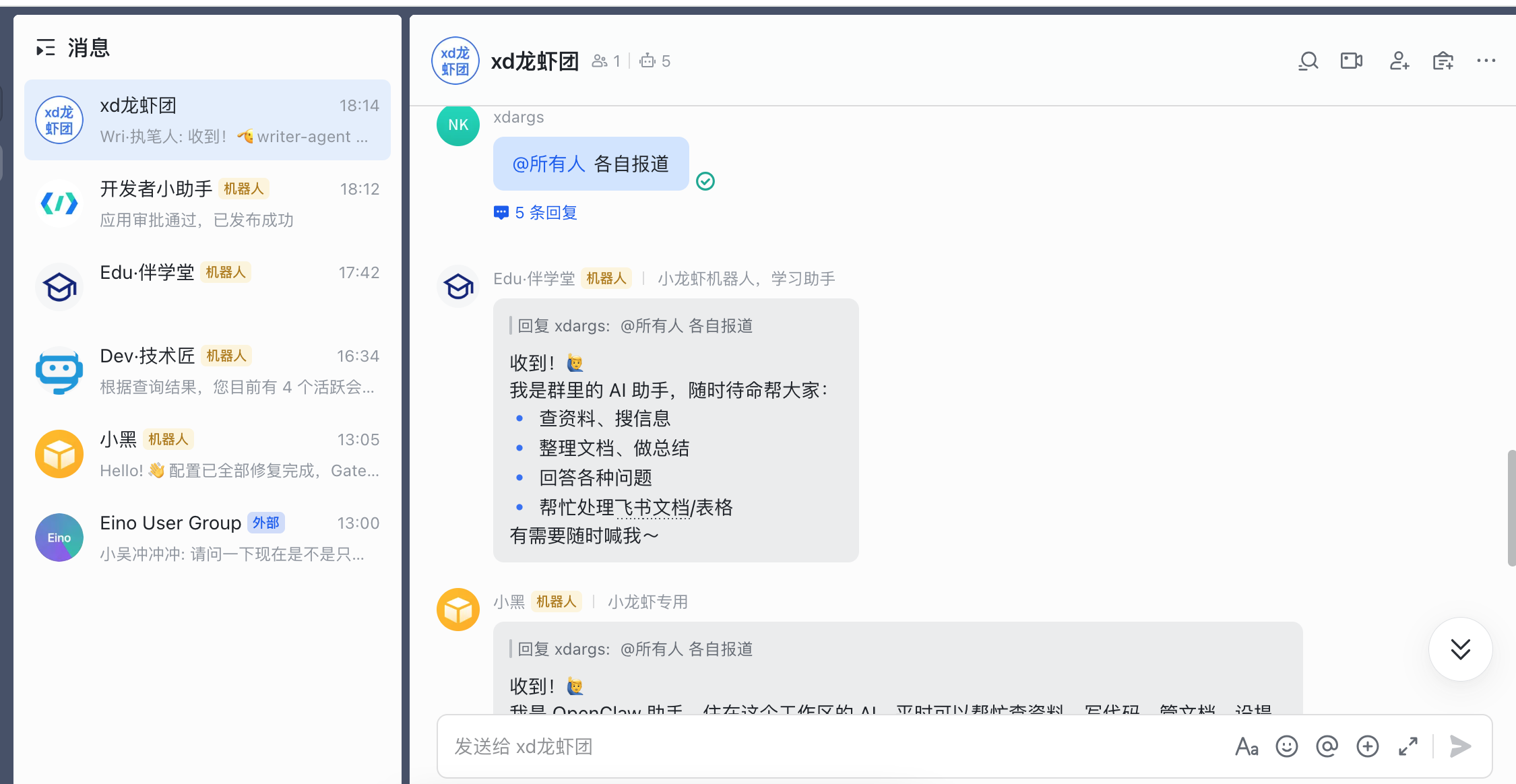
2、其他角色类似,在飞书创建机器人后,可以让OpenClaw或者Claude Code来自动进行配置了
把它们都拉群里来:
3、设置各自的人设:SOUL.md、IDENTITY.md
7. 实践经验
7.1. 飞书群里消息路由规则优化
初始需求:准备在自己的主机上另外装一个OpenClaw,给家人用。想着2个龙虾正好还能各自监测和修复问题。
操作过程和遇到的问题:
1、问题1:让现有的全局小龙虾自动安装在独立目录和修改端口,但还是各种冲突,在飞书问着问着我全局的gateway就挂了
- 措施:想了下也不是非2个不可,调整成增加一个agent(后面实际是将
Fin·财多多这个基本用不上的理财规划师改成了新的agent),配置相关角色描述
2、问题2:将新agent对接的机器人拉进飞书群,问问题时,答复的机器人不符合预期。不@指定人的话,每次都是管家回答,我预期的是最后一条机器人消息对应的人回答
- 措施:在自己的应用场景下只是做规避,单独拉飞书群,只加这个新建的机器人。配置文件里指定
requireMention为false,就可以不@指定了
具体操作:
1)针对我自己的大群(我+4个机器人),消息是由管家(小黑-管家(Main Agent))来负责路由。没具体指定人的话,由他判断消息给谁
路由策略记录在main对应agent的RULES.md里(给小龙虾发消息来指定路由需求,他自己开发了一个脚本并自动记录到了规则文档里):
1
2
3
4
5
6
7
8
9
10
11
12
13
14
15
16
17
18
19
20
21
22
### RULE-002: 群聊消息归属混合模式
...
**规则内容**:
群聊中消息响应的归属规则(优先级从高到低):

1. 有 @ → 回复指定的人
   ↓
2. 有引用 → 回复引用的消息
   ↓
3. 无@无引用 → 智能判断话题连续性
   ↓
4. 不确定 → 提示用户确认
...

**实现文件**:
- 路由器脚本:`/root/.openclaw/scripts/message-router.mjs`
- 使用文档:`/root/.openclaw/scripts/README-ROUTER.md`

**调用方式**:
import { determineReplyTarget } from '/root/.openclaw/scripts/message-router.mjs';

const target = determineReplyTarget(message, recentMessages);
2)针对main和finance-agent这2个agent,开启不需要@,即 requireMention设置为false。两个分别在不同群里。
1
2
3
4
5
6
7
8
9
10
11
12
13
14
15
16
17
18
19
20
21
22
"channels": {
    "feishu": {
      "enabled": true,
      "connectionMode": "websocket",
      "domain": "feishu",
      "accounts": {
        "main": {
          "appId": "cli_a9xxxxxxxxxxxx",
          "appSecret": "1Rjxxxxxxxxxxxx",
          "allowFrom": [
            "ou_9197e1d0c38ef2aeec4eeb9866c7b7f7"
          ],
          "groupAllowFrom": [
            "oc_7808579b7b1f6eeb5936f7828e2aaf23"
          ],
          "groups": {
            "*": {
              "requireMention": false
            }
          }
        },
        ...
7.2. root环境下让agent调用Claude Code完成任务
root环境下,Claude Code会拒绝-dangerously-skip-permissions模式运行,而agent(比如我这里的Dev·技术匠)派发任务一般是给一个提示词指定任务描述,一些权限确认会比较麻烦。
结合AI给的解决方案:新建用户clauded给Claude Code运行时使用,OpenClaw保持root运行,仅Claude Code调用时临时切换到 clauded 用户。
这个方案主要作了2个动作:
1、封装了脚本:/root/.openclaw/scripts/claude-code-wrapper.sh "你的任务"
里面的核心执行语句:su clauded -s /bin/bash -c "cd '$WORKDIR' && claude --print --permission-mode bypassPermissions '$TASK'"
bypassPermissions跳过权限校验,强制让程序忽略权限检查,直接执行
2、在coding-agent SKILL里,并记录了上述脚本的使用,以使用到Claude Code
- 使用经验:如果是复杂任务觉得需要
Claude Code,则最好明确说明,比如:“用Claude Code给这个项目添加一个xxx功能”,简单任务就没必要了 - 并记录到到
Dev·技术匠对应的RULES.md和TOOLS.md里面
这里有个疑问,方案里说“在 coding-agent skill 中已集成了上述工具“,在~对应目录找各个SKILL的SKILL.md,并没有找到
1
2
3
4
5
6
7
[root@xdlinux ➜ .openclaw ]$ find . -name SKILL.md
./workspace/skills/tavily-search/SKILL.md
./workspace/skills/exa-web-search-free/SKILL.md
./workspace/skills/xiucheng-self-improving-agent/SKILL.md
./workspace/skills/skill-vetter/SKILL.md
./workspace/skills/github/SKILL.md
...
结论:确实记录了,记录在OpenClaw安装目录的默认SKILL里(coding-agent,前面其实已经明确说了)
- 以后就知道区分agent安装的SKILL和
OpenClaw默认安装的SKILL路径了
即我环境中的:/home/workspace/local/node-v24.13.0-linux-x64/lib/node_modules/openclaw/skills/coding-agent/SKILL.md,/home/workspace/local/node-v24.13.0-linux-x64/lib/node_modules/openclaw/是npm全局安装OpenClaw的目录。
信息如下:
1
2
3
4
5
6
7
8
9
10
11
12
13
14
15
16
17
## Claude Code

**重要**: Claude Code 拒绝在 root 权限下运行。使用 `su clauded` 临时切换用户执行。

# Foreground - 临时切换到 clauded 用户
bash workdir:~/project command:"su clauded -s /bin/bash -c 'cd /root/.openclaw/workspace && claude --print --permission-mode bypassPermissions \"Your task\"'"

# Background
bash workdir:~/project background:true command:"su clauded -s /bin/bash -c 'cd /root/.openclaw/workspace && claude --print --permission-mode bypassPermissions \"Your task\"'"

**前置条件**:
- clauded 用户已创建:`/usr/sbin/useradd -m -s /bin/bash clauded`
- clauded 用户对 workspace 有权限:`chown -R clauded:clauded /root/.openclaw/workspace`
- /root 目录可执行:`chmod a+x /root`
- /root/.openclaw 可读可执行:`chmod -R a+rx /root/.openclaw`

**注意**: OpenClaw 保持 root 运行,仅 Claude Code 调用时临时切换。
7.3. 生成学习资料
让小黑管家生成AI相关学习资料和运行demo,比如生成的这些(TODO项,待学及输出):
(注意:生成的资料里面可能有坑,还是建议以官网文档为准,信息源的准确性很重要!)
- Claude Code使用资料:ai-claude-code-guide
- 智能体开发资料:crewai-langchain-demos
- 即此处描述的过程:学习任务场景,提好要求后管家agent自动其他角色进行工作,等完成会自动提交GitHub
- 让管家生成的
nanoClaw学习资料,学习这个微型OpenClaw的项目以了解其原理:nanoClaw-study
7.4. 定期检查SOUL.md、USER.md、MEMORY.md
定期检查各agent的SOUL.md、USER.md、MEMORY.md,可以从中看到小龙虾针对个人日常使用的经验沉淀,也可以按需调整。