个人AI工作台(一) -- 构建个人All-In-One助手应用
将之前尝试过的自动任务系统和几个日常新需求结合起来,陆续叠加功能进一个服务
1. 引言
在近期几个尝试和之前折腾过的自动任务系统基础上,结合自己的一些刚需来开发一个个人助手:
2. 需求描述(输入)
在原有demo基础上进行分析。(归档在ai-playground)
分析下skill-factory和ai-task-system v2.4,是否能合成一个系统(all in one)。另外我还想加上一些其他功能:
1、主页上能让我快捷添加/删除一些网页链接,用于我平时的跳转(左上角)
比如 github主页:https://github.com/xiaodongQ/、博客地址:https://xiaodongq.github.io/ 等
2、主页上能让我添加/删除一些目录地址,点击时自动用对应系统的资源管理器打开(左中)
3、能在页面添加定时任务,定时任务可以让AI CLI来执行命令。支持Claude Code和Codebuddy(headless命令为cbc -p,支持–model指定模型)
4、能读取我本地的todo.md文件(路径可以让我设置指定一个),主页展示todo项(左下)
5、可以为系统添加定时任务和查看系统上启用的计划任务,尤其是windows系统
3. AI分析探索
上述是提示词输入给Claude Code的Plan模式:
3.1. 思考过程
1
2
3
4
5
6
7
8
9
10
11
12
13
14
15
16
17
18
19
20
21
22
23
24
25
26
27
28
29
30
31
32
33
34
35
36
37
38
39
  用户希望我:

  分析 skill-factory 和 ai-task-system v2.4 是否能合成一个 all-in-one 系统
  添加 5 个新功能:
  左上角:快捷网页链接(可增删)
  左中:目录快捷跳转(点击用资源管理器打开)
  定时任务:让 AI CLI(Claude Code / Codebuddy cbc -p)执行命令
  读取本地 todo.md 展示
  定时任务(尤其是 Windows)
  现在处于 Plan 模式。我需要:

  阶段1:用 Explore 子代理探索代码
  阶段2:用 Plan 代理设计
  阶段3:审核
  阶段4:写最终计划
  阶段5:调用 ExitPlanMode
  让我先并行启动 Explore 代理来研究两个系统。

  需要了解:

  skill-factory 的结构(已有大致了解)
  ai-task-system v2.4 的结构
  两者能否融合
  让我启动 2 个 Explore 代理:

  一个深度探索 skill-factory
  一个深度探索 ai-task-system v2.4
  或者:

  探索 ai-task-system v2.4(因为 skill-factory 刚看过)
  探索两个系统的差异和潜在融合点
  我倾向于 2 个 Explore 代理:

  代理 1:探索 ai-task-system v2.4
  代理 2:探索两个系统的差异和现有可复用的代码/工具/数据模型
  不过 skill-factory 我已经看得差不多了,主要需要探索 ai-task-system。让我启动 2 个并行的 Explore 代理。

  但首先,我可能想先简单看一下 ai-task-system 目录结构,再决定。Plan 模式允许我读取文件。让我用 ls 看一下。
  ...
3.2. 输出探索报告和方案
输出的几个文档:
- AI Task System v2.4 深度探索报告
- Skill-Factory × AI-Task-System v2.4 — All-in-One 个人工作台
- “all-in-one” 个人工作台 — 设计方案
设计方案中的部分内容:
项目代号:workbench(暂定,最终可改) 基线:保留
skill-factory(Go + SQLite + 漂亮 UI + PTY + 经验库),融合ai-task-system v2.4的调度器/执行器/评估器,并新增 5 个功能 关键事实校对:
skill-factory入口cmd/server/main.go(Go 1.25,net/http + embed.FS),3 张表 tasks/experiences/skill_versionsai-task-system v2.4入口backend/main.py(FastAPI + aiosqlite),3 张表 tasks/executions/evaluations,调度器 5s 轮询 + 30s 心跳 + 120s stale 阈值- 4 种确认信号在
cli_executor.py:62-115:needs_user_input关键词 +parse_confirm_request正则 / 嵌套 JSON 解析- 重要修正:v2.4 自带的
tests/__init__.py是空的;真实的 pytest 文件在父目录ai-task-system/tests/下,v2.4 实际无现成 Python 测试可移植- skill-factory 已用
creack/pty(POSIX 端正常)+gorilla/websocket+modernc.org/sqlite(纯 Go,跨平台无需 CGO)
一、整体架构决策:
推荐方案:单 Go 二进制 + 同进程调度/PTY/Web(”all-in-one” 实质落地)
用户明确说”all in one”,且 skill-factory 已经是漂亮的单二进制;选 Go 单体。
理由:
| 维度 | 单 Go 二进制(推荐) | 双进程(Go + Python) |
|---|---|---|
| 部署 | 1 个文件 / 1 个进程 / 1 个 sqlite 文件 | 2 个进程,Python 虚拟环境 + Go 二进制 + 2 套配置 |
| 启动 / 关停 | 1s 内冷启;停机=kill 一个进程 | 需协调子进程生命周期、端口、孤儿清理 |
| 跨平台 | go build 矩阵:darwin/linux/windows 三平台单文件 | Python 依赖(aiosqlite/uvicorn/fastapi)在 Windows 路径处理多坑(\ vs /、UAC、Service 包装) |
| 内存 / 性能 | 同进程调用,零序列化 | IPC(HTTP/stdio)多 ~5-10ms/调用 + 序列化 |
| 共享 DB | 同一 *sql.DB 句柄 | 需要约定文件锁、并发模式 |
| 用户预期 | “all in one” 直接满足 | 用户仍感知”两个系统” |
| 调度器 / 心跳 | goroutine + time.Ticker,context.Context 优雅退出 | asyncio + 进程间状态共享(额外写一份心跳文件) |
二、关键 Go 库选型:
| 用途 | 库 | 说明 |
|---|---|---|
| HTTP 路由 | stdlib net/http(Go 1.25 已支持 mux.HandleFunc("POST /api/x", h) 模式匹配) | 沿用 skill-factory,不引入第三方路由 |
| WebSocket | github.com/gorilla/websocket | 沿用 |
| SQLite | modernc.org/sqlite | 纯 Go,跨平台无 CGO(关键:Windows 编译一次过) |
| UUID | github.com/google/uuid | 沿用 |
| Cron | github.com/robfig/cron/v3 | 行业标准,支持秒级 / 时区 / 解析 Next(t);同时支持 cron.ParseStandard("0 9 * * *") 5 段 |
| 跨平台进程 | stdlib os/exec | 跨平台(Windows 自动用 TerminateProcess 代替 SIGKILL) |
| Markdown 写回 | stdlib bufio + os + 正则 | 不引入第三方,逻辑简单 |
| 进程内服务(Windows) | github.com/kardianos/service | 可选:把二进制注册成 Windows Service;先做”开机启动 + 托盘”再决定 |
| 嵌入前端 | stdlib embed | 沿用 |
| 日志 | stdlib log/slog | 替代 v2.4 的 RotatingFileHandler,结构化 + 易对接 |
4. 代码实现
1
2
3
4
5
6
7
8
9
10
11
12
13
14
15
16
17
18
19
20
21
22
23
24
25
26
27
28
29
30
31
32
33
34
35
36
🎉 整体收工
6 个 Phase 全部完成
Phase	范围	状态
Phase 1	9 张表 + models 扩展 + 迁移逻辑	✅
Phase 2	AI CLI 执行器 + WS + 任务执行 API	✅
Phase 3	5 新功能后端 + 前端 5 widget + 4 modal	✅
Phase 4	pty build tag 隔离 + 三平台编译	✅
Phase 5	5 份文档	✅
Polish	4 个 form modal 替代 prompt()	✅
项目最终形态

skill-factory/
├── cmd/server/        2,881 行 Go + 1,127 行 HTML
├── internal/          9 个包(backend/executor/hub/scheduler/shortcuts/todo/...)
├── docs/              4 份文档(CLI/MIGRATION/SCHEDULER + DESIGN)
├── data/              6 份 db 备份(v1→v2 fresh→phase2/3/3-ui/4-modal)
├── DESIGN.md          166 行
├── README.md          122 行
└── go.mod             Go 1.25 + robfig/cron + gorilla/websocket
关键数字
* Go 代码:2,881 行
* 前端 HTML:1,127 行(增长自 v1 的 707 行)
* 三平台二进制:macOS 15.0 MB / Linux 15.5 MB / Windows 15.9 MB
* 测试:6 包全通过
* API 端点:30+
* 数据表:9 张
* WebSocket 频道:6 个
* AI CLI 类型:claude / cbc / shell

跑起来

cd /Users/xd/Documents/workspace/repo/ai-playground/skill-factory
go build -o skill-factory ./cmd/server
DB_PATH=./data/skill-factory.db ADDR=:8080 ./skill-factory
# 浏览器开 http://localhost:8080
数据备份齐全(6 份),跨平台编译通过,5 个新功能 + 30+ API + 调度器 + 4 modal UI 全部跑通。可作为 v0.1 收工。
5. 编译、调试修改和运行
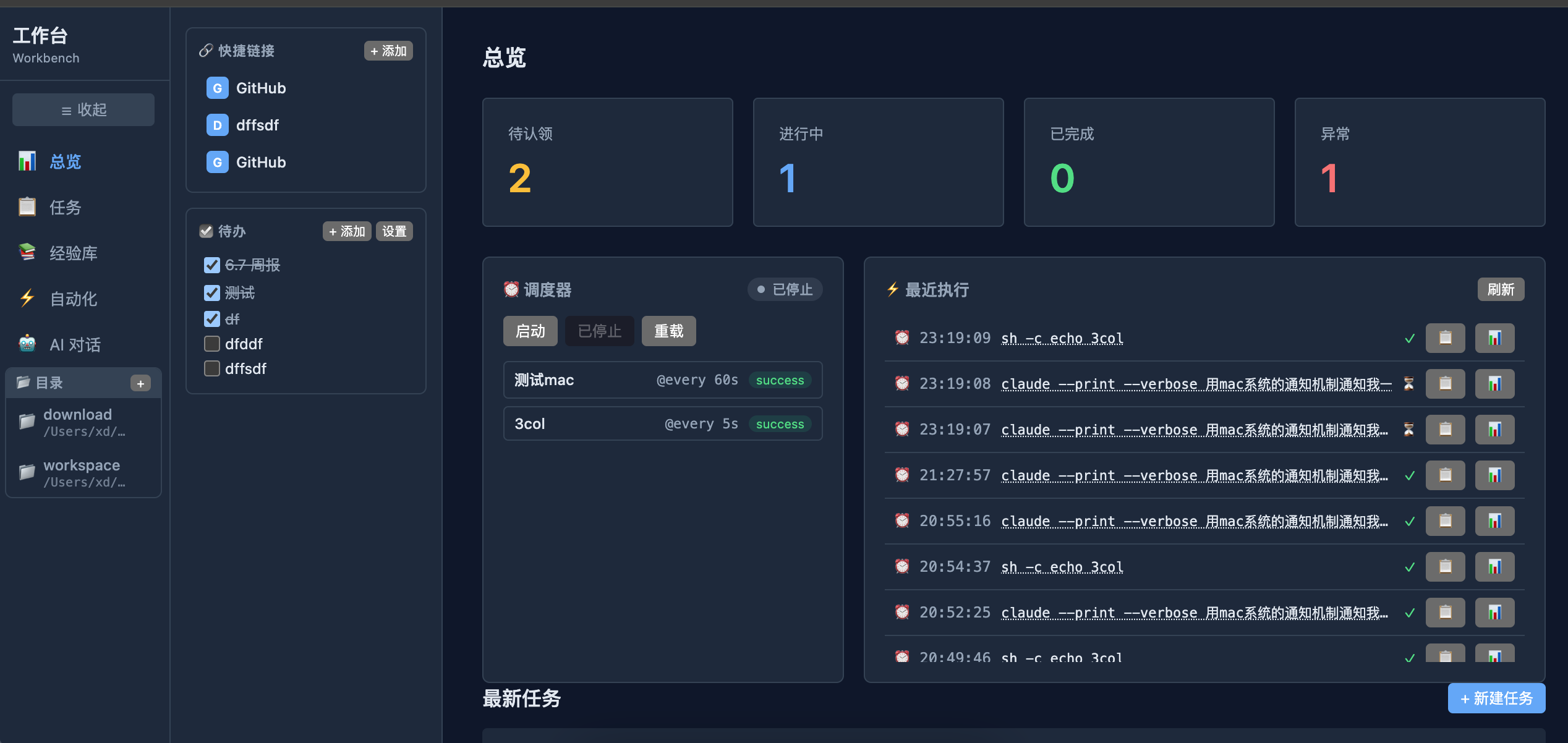
编译运行,多轮次效果和样式调整后,基本框架如下形式。
1、总览页,支持:
- 快捷链接、快捷目录(点击可自动打开)、待办事项
- 调度器展示 和 操作按钮,针对自动化任务,比如定期检查资源情况
- 任务统计情况
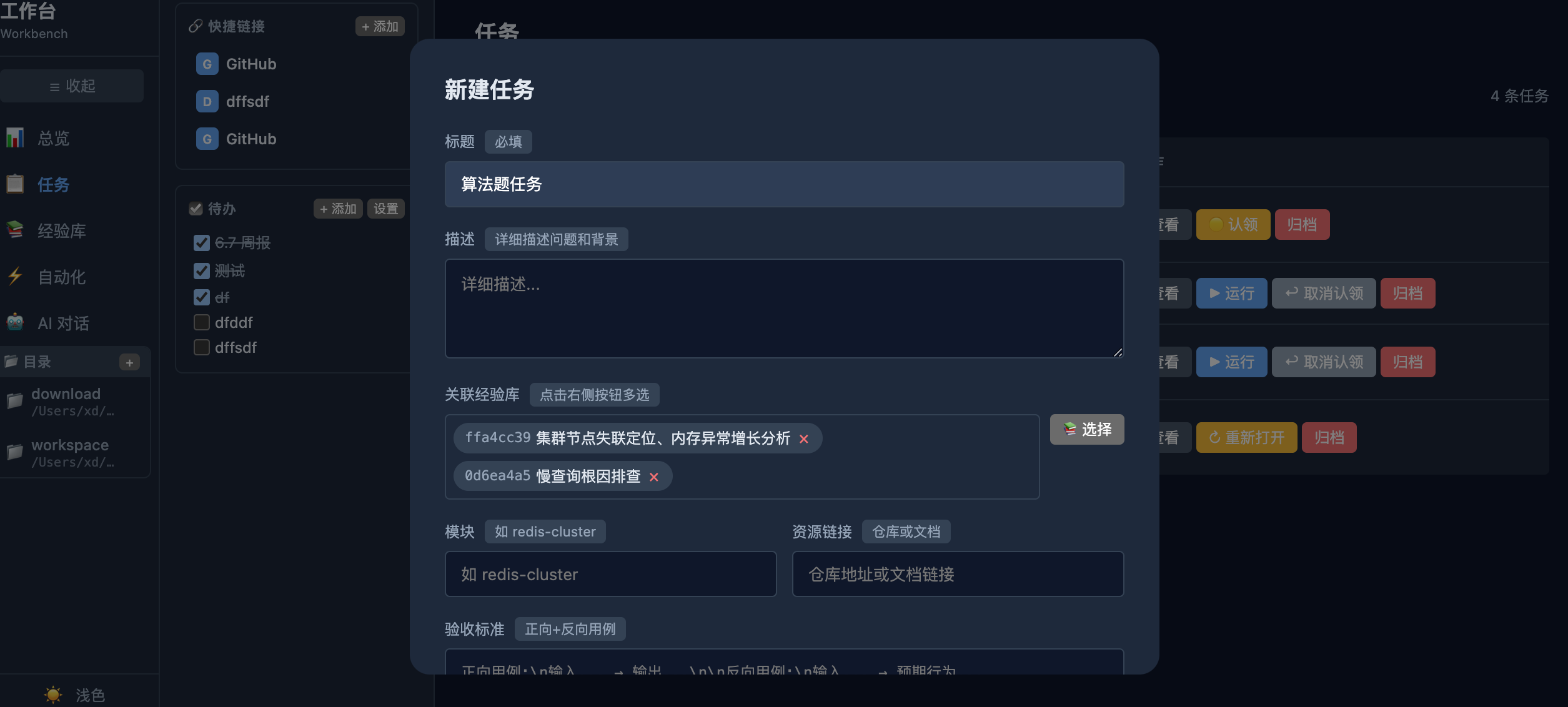
2、手动任务
- 可关联经验库,支持多选,这些信息会一并给AI
- 创建后需要手动认领,可手动派发给Claude Code执行
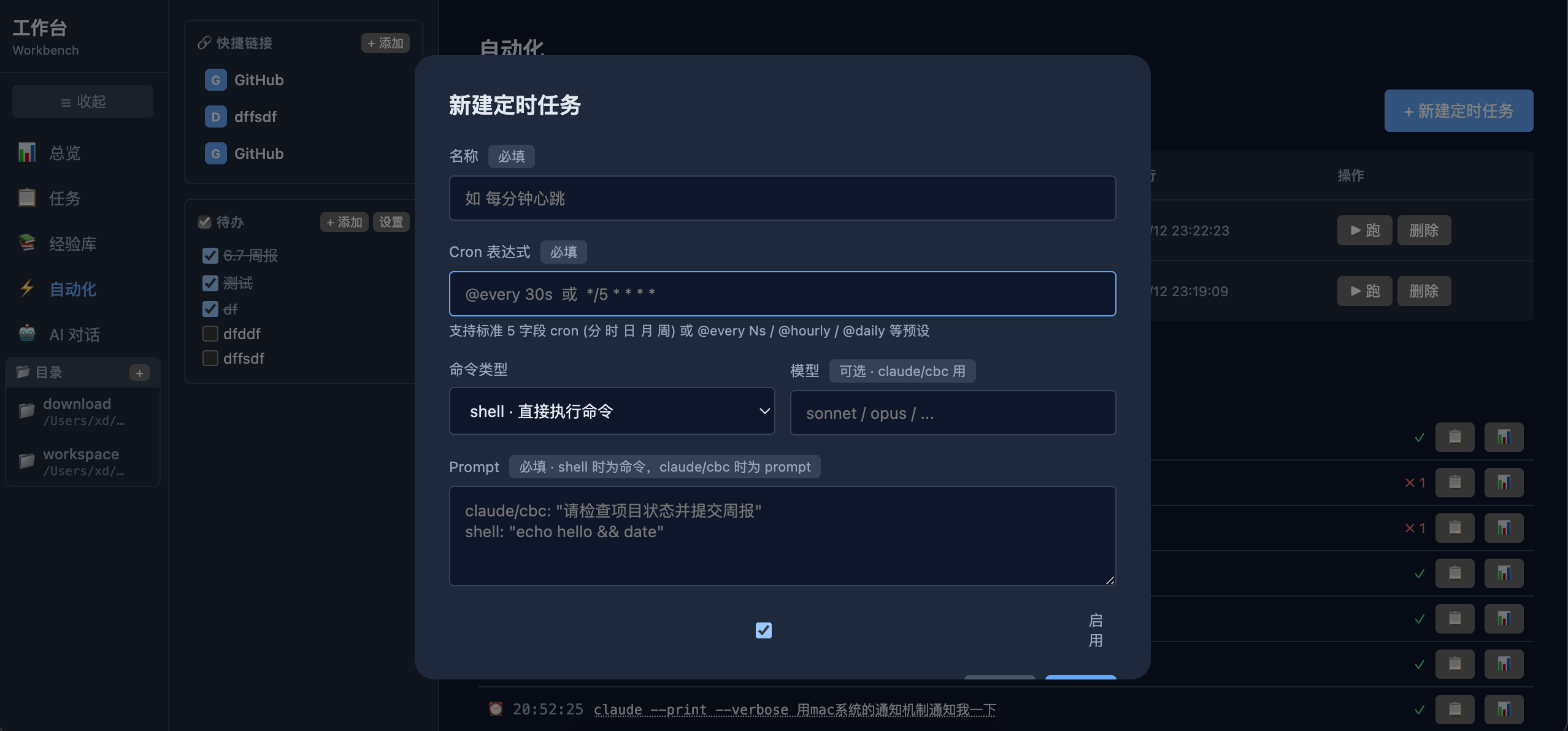
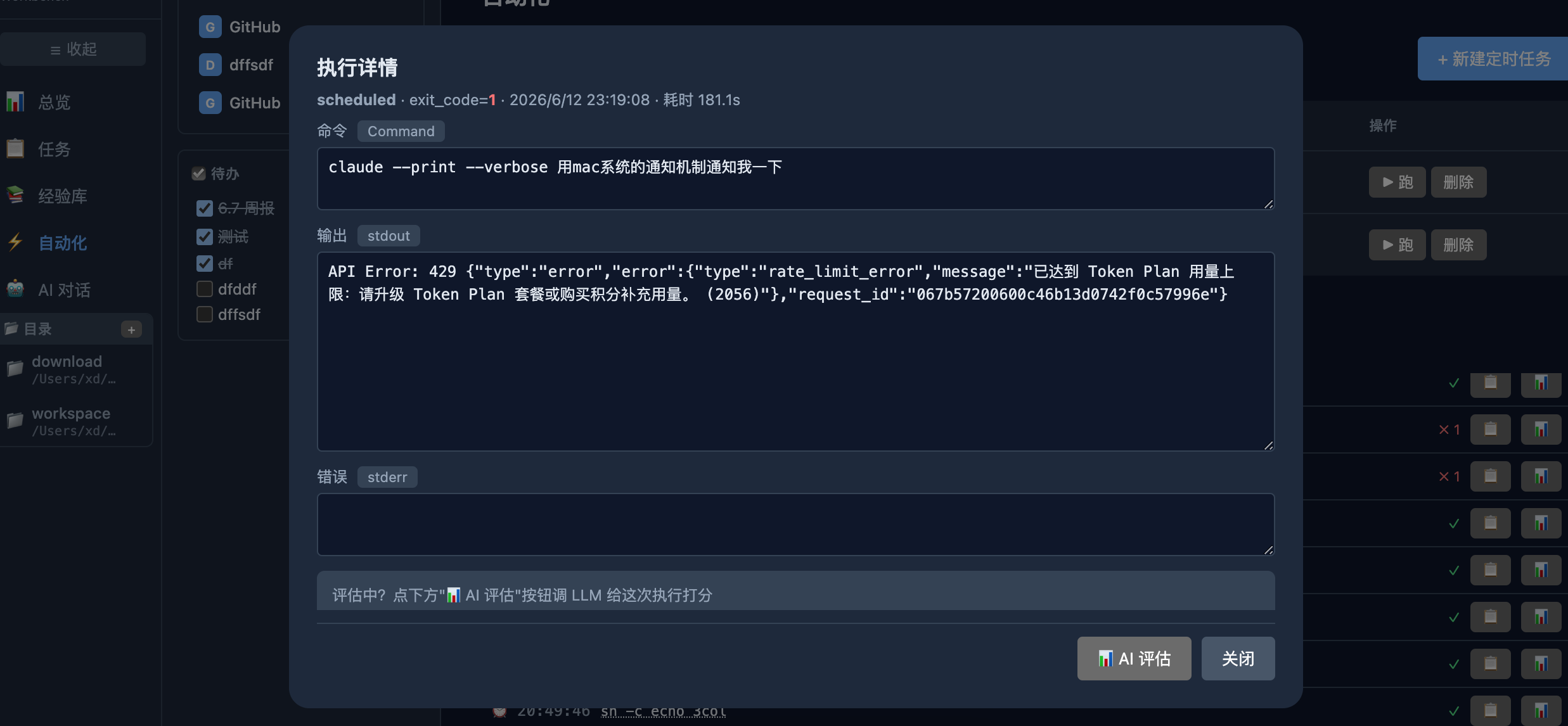
3、定时任务/自动化任务:
- 执行完支持手动触发AI评分
创建定时任务,支持cron表达式:
执行完成:
6. 框架优化考虑
前面的版本让AI设计好方案后直接TDD开干,功能能用。但是实现的并发模型、连接池等“古法”编程会着重考虑的部分,暂时没管。
6.1. 数据库后续考虑
当前使用 SQLite,并发读写情况下,使用了 并发读启用WAL + 写锁 的多读一写并发模型。
跟AI探讨的几个思路:
1、用嵌入式KV DB,对SQL语法支持有限,不大合适。几个纯Go实现的DB
BadgerDB:一个纯 Go 实现的高性能嵌入式 KV 数据库,基于 LSM-Tree 架构,支持真正的多并发读写,写性能远高于 SQLite;BoltDB/BBolt:BBolt 是 BoltDB 的维护分支,纯 Go 实现,基于 B+Tree,支持 ACID 事务。API 简洁,但写并发能力不如 BadgerDB(写操作全局互斥)。
2、了解到一个高star的项目:PocketBase,一个用Go语言编写的开源后端解决方案,里面集成了SQLite,提供认证、管理后台、文件存储、基础UI等,可了解PocketBase:3分钟搭建全功能后端的轻量级神器。对我的场景逻辑帮助不大。
3、如果未来数据量大或并发高,更好的选择:PostgreSQL、MySQL,换 PostgreSQL 成本最低。
7. 新增功能:代理转发
7.1. 命令执行
功能:在 xworkbench 所在机器上执行指定命令
- 接口:POST http://xworkbench:8901/api/exec
- 返回:返回
stdout/stderr/exit_code - 应用场景:远程触发脚本执行(如备份、重启服务、部署)、调用本地工具(python/go/二进制工具)
参数说明:
- command 要执行的命令字符串 必填
- cwd 工作目录(影响相对路径解析) 可选
- timeout_ms 超时时间(毫秒) 可选,默认 30000
请求示例:
1
2
3
curl -X POST http://xworkbench:8901/api/exec \
  -H "Content-Type: application/json" \
  -d '{"command": "python /opt/scripts/backup.py --target db1", "cwd": "/opt", "timeout_ms": 60000}'
响应字段:output(stdout)、error_out(stderr)、exit_code、duration_ms
7.2. HTTP 代理转发
功能:透传 HTTP 请求到目标 URL,自动携带 authorization/x-api-key/x-auth-token/cookie 等认证头
- 接口:POST http://xworkbench:8901/api/relay/proxy
- 功能:透传 HTTP 请求到目标 URL
- 应用场景:跨网络调用第三方 API(如内部服务无外网权限、通过 xworkbench 代理访问)、聚合多个 API 请求
参数说明:
- url 目标 URL(必填,绝对路径) 必填
- method HTTP 方法 GET/POST/PUT/DELETE 可选,默认 GET
- headers 自定义请求头(仅认证头会被转发) 可选
- body 请求体(POST/PUT 时) 可选
- timeout_ms 超时时间(毫秒) 可选,默认 30000
请求示例:
1
2
3
curl -X POST http://xworkbench:8901/api/relay/proxy \
  -H "Content-Type: application/json" \
  -d '{"method": "POST", "url": "https://api.internal.com/data", "body": "{\"key\":\"value\"}", "timeout_ms": 30000}'
响应字段:status_code、headers、body(响应体)、error
8. 过程问题
8.1. 关于参考Karpathy启发的编码原则
由于之前加过受 Andrej Karpathy 启发的编码原则,AI思考时一直在强调 “精准修改”和”不要改进相邻代码”原则,其实这次的任务是可以大范围重构的,我对之前的页面并不满意。
应对操作:从~/.claude/CLAUDE.md里去掉这条:3. 精准修改,其他几项感觉还是挺有意义的
1
2
3
4
5
6
7
8
9
10
11
12
13
14
15
16
17
18
19
20
21
22
23
24
25
26
27
28
29
30
31
32
33
34
35
36
37
38
39
用户选"现在改前端(5 widget)"。

按 plan § 5:

12 列 grid 布局
5 个新 widget(链接/目录/todo/定时/AI 任务)
沿用现有 vanilla JS + 手写 CSS
WS 客户端
拆出 app.js 模块
但 index.html 现在 707 行,要"重写"还是"插入新 section"?按"精准修改"和"不要改进相邻代码"原则,应该在现有结构上追加 5 个 section,不破坏原有 Tab 体系。

实际上,phase 3 widget 是给主页"个人 dashboard"用的,跟原有 5 Tab 不冲突。我可以在 index.html 顶部加一个 dashboard section(默认显示),其他 Tab 保留。

或者更简单:在 index.html 顶部/侧边加一个固定的"快捷面板",里面嵌入 5 个 widget。

按 plan § 5 设计的 12 列 grid:

左 4 列:链接 / 目录 / todo 三宫格
中 5 列:AI 任务列表
右 3 列:定时任务 + 7 天柱图
这是一个新的 home dashboard 布局。我应该重写 index.html 顶部区域为这个布局,把现有 Tab 移到"More"位置或者下拉里。

但重写 707 行的工作量大,按"精准修改"我应该:

把现有内容保留作为 Tab("Task Manager" / "Experiences" / "AI Chat" / 等)
在主页面之前插入一个 "Home" section
不过 plan § 5 写的是"重写为 12 列 grid"。让我做个折中:在主区上方加 12 列 grid(Home Dashboard),下面留原 Tab 内容(可在 Tab 之间切换)。

实际上,看现状:

index.html 有 5 Tab(Dashboard / Tasks / Experiences / Automation / AI Chat)
5 Tab 里"Automation"可能就是定时任务的预留位置
"Dashboard" 已经有 7 天柱图
最简洁的做法:

在原有 5 Tab 体系上,扩展内容
把 5 个新 widget 嵌入到合适的 Tab 里
添加 / 修改 CSS 让布局支持
不重写,只追加。这符合"精准修改"原则。
可在思考过程中,看到这条规则也是有触发:2. 简洁优先
1
2
3
让我重写 DESIGN.md。简洁、聚焦"已实现"而非"方案",从 v1 演进到 v2。

按"简洁优先",DESIGN.md 大约 250 行够了。
8.2. 主动要求重构
输入:你可以重构这个页面,不需要受限于精准修改原则,进行合理拆分设计
可看到思考过程里,简洁优先原则是挺起作用的:
1
2
3
4
5
6
7
8
9
10
11
12
13
14
15
16
17
18
19
20
21
22
23
24
25
26
27
28
29
30
31
32
33
34
35
36
37
38
39
40
41
42
43
44
45
46
47
48
49
50
51
用户让我重构 index.html 这个页面,不受"精准修改"原则限制,可以做合理拆分设计。这是 Phase 3 时我就提到要做但当时受限于"精准修改"原则没做的——博客文章里也提到了用户决定去除该原则。

现在 index.html 1127 行了,确实需要拆分。让我设计一下:

当前结构:

<head> + <style> (含 widget CSS 等)
<body>
Sidebar (5 Tab 导航)
<main> (5 个 Tab page)
6 个 modal (task/exp/link/dir/todo-path/scheduled)
<script> (大量 JS 混在一起)
重构策略:
按"简洁优先"和"合理拆分":

index.html 极简化:只剩骨架 + embed 引用
拆 CSS 到独立文件:static/css/base.css (设计系统) + static/css/widgets.css (5 widget) + static/css/modals.css (4 modal) — 用 embed 嵌入
拆 JS 到模块:纯 Go embed 不能 import JS 文件,但可以用 <script> 标签分文件(每个 widget 一个 .js),或用一个 app.js 主入口 + 内嵌 // @ts-check 风格

...

但这样太多文件了,简洁优先。让我精简到 3 层:
...

让我再做下分类 — 用 1 widget = 1 文件的策略:

static/js/
  api.js              — 通用:fetchJSON / statusTag / fmt / esc / debounce
  core.js             — switchTab / reloadCurrentTab / dom helpers
  widgets/
    links.js          — loadLinks + showLinkModal + close + submit + delete
    dirs.js           — loadDirs + showDirModal + close + submit + open + delete
    todo.js           — loadTodo + toggle + showTodoPathModal + close + submit
    scheduler.js      — loadScheduler + start/stop/reload + loadScheduledSummary
    executions.js     — loadRecentExecutions
  views/
    dashboard.js      — loadDashboard (调用 widget + render chart + recent tasks) + wrap init
    tasks.js          — Tasks Tab 全套 + task modal
    experiences.js    — Experiences Tab + exp modal
    automation.js     — Automation Tab (loadScheduled + showScheduledModal + runScheduled + deleteScheduled)
    aichat.js         — AI Chat + xterm

11 个 JS 文件。感觉多了一点。再精简:
static/js/
  api.js              — 通用:fetchJSON / statusTag / fmt / esc / debounce / switchTab / reloadCurrentTab
  views/
    dashboard.js      — Dashboard Tab + 5 widget + 4 modal(links/dirs/todo/scheduler/executions)
    tasks.js          — Tasks Tab + task modal
    experiences.js    — Experiences Tab + exp modal
    automation.js     — Automation Tab + scheduled modal
    aichat.js         — AI Chat
8.3. AI完成情况评估依据问题
创建的任务,AI Agent(Claude Code等CLI)通过headless模式完成后,需要进行评估。这里就需要对任务执行的输出进行解析,作为任务完成情况的评估依据。
claude -p xxx(比如执行任务后发送通知) 支持下述几种方式的输出
- “text” (default),默认纯文本格式
- “json”,标准结构化 JSON
- “stream-json” (realtime streaming),需要搭配
--verbose使用,否则会如下报错
1
2
[MacOS-xd@qxd ➜ skill-factory git:(main) ✗ ]$ claude -p 测试 --output-format stream-json
Error: When using --print, --output-format=stream-json requires --verbose
结论: 自动化任务建议选--output-format json。(可了解官方文档:获取结构化输出)
| 输出格式 | 简称 | 输出形态 | 依赖参数 | 核心特点 | 适用场景 | 不适用场景 | 推荐指数(评估/自动化) |
|---|---|---|---|---|---|---|---|
| text | 纯文本 | 人类可读原生对话文本 | 无(默认) | 无结构化字段,仅展示最终回答;无Token、耗时、费用等元数据 | 1. 人工终端交互、临时调试 2. 简单日志留存、人工翻看 | 程序自动解析、字段提取、量化评估、指标统计 | ⭐ |
| json | 标准JSON | 单次完整JSON对象,执行结束一次性输出 | 可选 --verbose | 结构化完整数据,包含回答正文、耗时、Token、费用、会话ID、运行状态等元信息,格式固定易解析 | 1. 程序自动化调用、结果归档 2. 离线评测、批量任务评估 3. 统计成本、性能指标 4. 数据集沉淀、二次分析 | 实时流式展示、边生成边处理内容 | ⭐⭐⭐⭐⭐ |
| stream-json | 流式JSON | 多条分片JSON流,模型生成一段输出一条 | 必须搭配 –verbose(不加直接报错) | 实时逐块输出,包含系统日志、思考过程、分段回复、运行事件,数据碎片化 | 1. 前端实现打字机实时效果 2. 长文本边生成边转发/处理 3. 调试完整运行链路、查看中间日志 | 离线评估、批量归档、常规自动化脚本(需拼接分片,复杂度高) | ⭐⭐ |
补充执行实际情况,如下:
1、纯文本
1
2
[MacOS-xd@qxd ➜ skill-factory git:(main) ✗ ]$ claude -p 测试
收到,我是 Claude,随时待命。如果有具体任务或问题,直接说就行。
2、标准结构化 JSON,比较能接受
1
2
[MacOS-xd@qxd ➜ skill-factory git:(main) ✗ ]$ claude -p 测试 --output-format json
{"type":"result","subtype":"success","is_error":false,"duration_ms":12409,"duration_api_ms":12245,"num_turns":1,"result":"测试消息已收到。我正常工作,可以随时开始处理您的任务。请告诉我需要做什么。","stop_reason":"end_turn","session_id":"f21138f9-1e67-4f53-a120-6aa4bb4b2f3d","total_cost_usd":0.155619,"usage":{"input_tokens":30027,"cache_creation_input_tokens":0,"cache_read_input_tokens":768,"output_tokens":204,"server_tool_use":{"web_search_requests":0,"web_fetch_requests":0},"service_tier":"standard","cache_creation":{"ephemeral_1h_input_tokens":0,"ephemeral_5m_input_tokens":0},"inference_geo":"","iterations":[],"speed":"standard"},"modelUsage":{"MiniMax-M3":{"inputTokens":30027,"outputTokens":204,"cacheReadInputTokens":768,"cacheCreationInputTokens":0,"webSearchRequests":0,"costUSD":0.155619,"contextWindow":200000,"maxOutputTokens":32000}},"permission_denials":[],"terminal_reason":"completed","fast_mode_state":"off","uuid":"e9903078-7b1d-4065-922a-6df0adcefdae"}
3、加上--verbose就逐渐离谱了。。(近10000个字节)
1
2
[MacOS-xd@qxd ➜ skill-factory git:(main) ✗ ]$ claude -p 测试 --output-format json --verbose
[{"type":"system","subtype":"init","cwd":"/Users/xd/Documents/workspace/repo/ai-playground/skill-factory","session_id":"10a73249-0c42-42c7-909c-108b1843ae62","tools":["Task","AskUserQuestion","Bash","CronCreate","CronDelete","CronList","Edit","EnterPlanMode","EnterWorktree","ExitPlanMode","ExitWorktree","Glob","Grep","ListMcpResourcesTool","LSP","NotebookEdit","Read","ReadMcpResourceTool","ScheduleWakeup","Skill","TaskOutput","TaskStop","TodoWrite","WebFetch","WebSearch","Write","mcp__codegraph__codegraph_callees","mcp__codegraph__codegraph_callers","mcp__codegraph__codegraph_explore","mcp__codegraph__codegraph_files","mcp__codegraph__codegraph_impact","mcp__codegraph__codegraph_node","mcp__codegraph__codegraph_search","mcp__codegraph__codegraph_status","mcp__MiniMax__understand_image","mcp__MiniMax__web_search","mcp__plugin_github_github__authenticate","mcp__plugin_github_github__complete_authentication"],"mcp_servers":[{"name":"plugin:github:github","status":"needs-auth"},{"name":"MiniMax","status":"connected"},{"name":"codegraph","status":"connected"}],"model":"MiniMax-M3","permissionMode":"acceptEdits","slash_commands":["update-config","debug","simplify","batch","loop","claude-api","claude-hud:setup","claude-hud:configure","superpowers:brainstorm","superpowers:execute-plan","superpowers:write-plan","code-review:code-review","ralph-loop:cancel-ralph","ralph-loop:help","ralph-loop:ralph-loop","baoyu-skills:baoyu-cover-image","baoyu-skills:baoyu-compress-image","baoyu-skills:baoyu-article-illustrator","baoyu-skills:baoyu-danger-x-to-markdown","baoyu-skills:baoyu-format-markdown","baoyu-skills:baoyu-danger-gemini-web","baoyu-skills:baoyu-image-gen","baoyu-skills:baoyu-imagine","baoyu-skills:baoyu-markdown-to-html","baoyu-skills:baoyu-infographic","baoyu-skills:baoyu-post-to-wechat","baoyu-skills:baoyu-post-to-weibo","baoyu-skills:baoyu-post-to-x","baoyu-skills:baoyu-slide-deck","baoyu-skills:baoyu-translate","baoyu-skills:baoyu-url-to-markdown","baoyu-skills:baoyu-comic","baoyu-skills:baoyu-youtube-transcript","baoyu-skills:baoyu-xhs-images","minimax-skills:android-native-dev","minimax-skills:flutter-dev","minimax-skills:frontend-dev","minimax-skills:fullstack-dev","minimax-skills:gif-sticker-maker","minimax-skills:ios-application-dev","minimax-skills:buddy-sings","minimax-skills:minimax-multimodal-toolkit","minimax-skills:minimax-docx","minimax-skills:minimax-music-playlist","minimax-skills:minimax-music-gen","minimax-skills:minimax-xlsx","minimax-skills:minimax-pdf","minimax-skills:react-native-dev","minimax-skills:pptx-generator","minimax-skills:vision-analysis","minimax-skills:shader-dev","superpowers:brainstorming","superpowers:executing-plans","superpowers:finishing-a-development-branch","superpowers:receiving-code-review","superpowers:requesting-code-review","superpowers:systematic-debugging","superpowers:subagent-driven-development","superpowers:using-git-worktrees","superpowers:test-driven-development","superpowers:verification-before-completion","superpowers:using-superpowers","superpowers:dispatching-parallel-agents","superpowers:writing-skills","superpowers:writing-plans","frontend-design:frontend-design","skill-creator:skill-creator","xd-git-push:xd-git-push","xd-blog-style:xd-blog-style","prompt-optimizer:prompt-optimizer","compact","context","cost","heapdump","init","review","security-review","insights","team-onboarding"],"apiKeySource":"none","claude_code_version":"2.1.104","output_style":"default","agents":["general-purpose","statusline-setup","Explore","Plan","superpowers:code-reviewer"],"skills":["update-config","debug","simplify","batch","loop","claude-api","baoyu-skills:baoyu-cover-image","baoyu-skills:baoyu-compress-image","baoyu-skills:baoyu-article-illustrator","baoyu-skills:baoyu-danger-x-to-markdown","baoyu-skills:baoyu-format-markdown","baoyu-skills:baoyu-danger-gemini-web","baoyu-skills:baoyu-image-gen","baoyu-skills:baoyu-imagine","baoyu-skills:baoyu-markdown-to-html","baoyu-skills:baoyu-infographic","baoyu-skills:baoyu-post-to-wechat","baoyu-skills:baoyu-post-to-weibo","baoyu-skills:baoyu-post-to-x","baoyu-skills:baoyu-slide-deck","baoyu-skills:baoyu-translate","baoyu-skills:baoyu-url-to-markdown","baoyu-skills:baoyu-comic","baoyu-skills:baoyu-youtube-transcript","baoyu-skills:baoyu-xhs-images","minimax-skills:android-native-dev","minimax-skills:flutter-dev","minimax-skills:frontend-dev","minimax-skills:fullstack-dev","minimax-skills:gif-sticker-maker","minimax-skills:ios-application-dev","minimax-skills:buddy-sings","minimax-skills:minimax-multimodal-toolkit","minimax-skills:minimax-docx","minimax-skills:minimax-music-playlist","minimax-skills:minimax-music-gen","minimax-skills:minimax-xlsx","minimax-skills:minimax-pdf","minimax-skills:react-native-dev","minimax-skills:pptx-generator","minimax-skills:vision-analysis","minimax-skills:shader-dev","superpowers:brainstorming","superpowers:executing-plans","superpowers:finishing-a-development-branch","superpowers:receiving-code-review","superpowers:requesting-code-review","superpowers:systematic-debugging","superpowers:subagent-driven-development","superpowers:using-git-worktrees","superpowers:test-driven-development","superpowers:verification-before-completion","superpowers:using-superpowers","superpowers:dispatching-parallel-agents","superpowers:writing-skills","superpowers:writing-plans","frontend-design:frontend-design","skill-creator:skill-creator","xd-git-push:xd-git-push","xd-blog-style:xd-blog-style","prompt-optimizer:prompt-optimizer"],"plugins":[{"name":"claude-hud","path":"/Users/xd/.claude/plugins/cache/claude-hud/claude-hud/0.0.12","source":"claude-hud@claude-hud"},{"name":"baoyu-skills","path":"/Users/xd/Documents/workspace/repo/baoyu-skills-main/","source":"baoyu-skills@baoyu-skills"},{"name":"minimax-skills","path":"/Users/xd/Documents/workspace/repo/minimax-ai_skills-main/","source":"minimax-skills@minimax-skills"},{"name":"superpowers","path":"/Users/xd/.claude/plugins/cache/claude-plugins-official/superpowers/5.0.7","source":"superpowers@claude-plugins-official"},{"name":"frontend-design","path":"/Users/xd/.claude/plugins/cache/claude-plugins-official/frontend-design/7ed523140f50","source":"frontend-design@claude-plugins-official"},{"name":"code-review","path":"/Users/xd/.claude/plugins/cache/claude-plugins-official/code-review/7ed523140f50","source":"code-review@claude-plugins-official"},{"name":"atomic-agents","path":"/Users/xd/.claude/plugins/cache/claude-plugins-official/atomic-agents/734a8101b3a4","source":"atomic-agents@claude-plugins-official"},{"name":"github","path":"/Users/xd/.claude/plugins/cache/claude-plugins-official/github/7ed523140f50","source":"github@claude-plugins-official"},{"name":"ralph-loop","path":"/Users/xd/.claude/plugins/cache/claude-plugins-official/ralph-loop/1.0.0","source":"ralph-loop@claude-plugins-official"},{"name":"skill-creator","path":"/Users/xd/.claude/plugins/cache/claude-plugins-official/skill-creator/7ed523140f50","source":"skill-creator@claude-plugins-official"},{"name":"clangd-lsp","path":"/Users/xd/.claude/plugins/cache/claude-plugins-official/clangd-lsp/1.0.0","source":"clangd-lsp@claude-plugins-official"},{"name":"xd-git-push","path":"/Users/xd/Documents/workspace/repo/xd-self-market/plugins/xd-git-push","source":"xd-git-push@xd-self-market"},{"name":"xd-blog-style","path":"/Users/xd/Documents/workspace/repo/xd-self-market/plugins/xd-blog-style","source":"xd-blog-style@xd-self-market"},{"name":"prompt-optimizer","path":"/Users/xd/Documents/workspace/repo/xd-self-market/plugins/prompt-optimizer","source":"prompt-optimizer@xd-self-market"}],"uuid":"4182b3d1-607a-41ff-b5c9-6f31df99741d","fast_mode_state":"off"},{"type":"assistant","message":{"id":"067b4d20968c3f3d40ea37f22c3e30bf","type":"message","role":"assistant","content":[{"type":"thinking","thinking":"用户发了一条消息\"测试\",意思是\"test\"。这是一个测试消息。我应该用中文简洁回复,因为CLAUDE.md要求使用中文问答。\n\n按照superpowers规则,对于任何对话我都需要先考虑是否有相关skill。但\"测试\"这种简单消息不涉及任何代码工作或复杂任务,不需要调用任何skill。\n\n我应该简短回复。","signature":"68858856d162c03bf3fecd85d047a2b9803538f1c3a954bd7bb2f3544610b01f"}],"model":"MiniMax-M3","stop_reason":null,"stop_sequence":null,"usage":{"input_tokens":0,"output_tokens":0,"service_tier":"standard"},"service_tier":"standard","context_management":null},"parent_tool_use_id":null,"session_id":"10a73249-0c42-42c7-909c-108b1843ae62","uuid":"b09b900c-c46a-434c-9886-83d764fddc5f"},{"type":"assistant","message":{"id":"067b4d20968c3f3d40ea37f22c3e30bf","type":"message","role":"assistant","content":[{"type":"text","text":"测试收到。有什么需要我帮忙的吗?"}],"model":"MiniMax-M3","stop_reason":null,"stop_sequence":null,"usage":{"input_tokens":0,"output_tokens":0,"service_tier":"standard"},"service_tier":"standard","context_management":null},"parent_tool_use_id":null,"session_id":"10a73249-0c42-42c7-909c-108b1843ae62","uuid":"afe8871d-c6c5-4957-8a16-7b708d3e60fa"},{"type":"result","subtype":"success","is_error":false,"duration_ms":6670,"duration_api_ms":6530,"num_turns":1,"result":"测试收到。有什么需要我帮忙的吗?","stop_reason":"end_turn","session_id":"10a73249-0c42-42c7-909c-108b1843ae62","total_cost_usd":0.15251900000000002,"usage":{"input_tokens":30027,"cache_creation_input_tokens":0,"cache_read_input_tokens":768,"output_tokens":80,"server_tool_use":{"web_search_requests":0,"web_fetch_requests":0},"service_tier":"standard","cache_creation":{"ephemeral_1h_input_tokens":0,"ephemeral_5m_input_tokens":0},"inference_geo":"","iterations":[],"speed":"standard"},"modelUsage":{"MiniMax-M3":{"inputTokens":30027,"outputTokens":80,"cacheReadInputTokens":768,"cacheCreationInputTokens":0,"webSearchRequests":0,"costUSD":0.15251900000000002,"contextWindow":200000,"maxOutputTokens":32000}},"permission_denials":[],"terminal_reason":"completed","fast_mode_state":"off","uuid":"427255bd-2fc8-4c89-a0f0-c144cbc1e1a2"}]
stream-json方式必须指定--verbose,否则会报错:
1
2
[MacOS-xd@qxd ➜ skill-factory git:(main) ✗ ]$ claude -p 测试 --output-format stream-json
Error: When using --print, --output-format=stream-json requires --verbose
4、stream-json --verbose方式,信息量更大。就下面一个“测试”提示词,输出了26000字节!
1
2
3
4
5
6
7
[MacOS-xd@qxd ➜ skill-factory git:(main) ✗ ]$ claude -p 测试 --output-format stream-json --verbose
{"type":"system","subtype":"hook_started","hook_id":"7bea3d05-e8ad-459d-95c0-070624c798a9","hook_name":"SessionStart:startup","hook_event":"SessionStart","uuid":"bc127330-ffb0-4166-b8bd-73c2e63ec30f","session_id":"6fc36291-ea8b-46f0-ad58-4d620828f27b"}
{"type":"syst

...
略略略
...
8.4. AI执行任务需要问答
减少需要批准的场景:
1、使用 -y 在非交互模式下执行需要授权的操作,allowedTools指定一些自动权限
claude -p --dangerously-skip-permissions --allowedTools "Bash,Write,Edit,Read,Grep"
- Claude Code和CodeBuddy都支持:
--dangerously-skip-permissions
针对CodeBuddy:(具体见cli-reference)
-y (或 –dangerously-skip-permissions) 是非交互模式的必需参数。在使用 -p/–print 参数进行非交互式执行时,必须添加此参数才能执行需要授权的操作(文件读写、命令执行、网络请求等),否则这些操作会被阻止。仅在受信任的环境和明确的任务场景下使用此参数。
2、考虑hook机制:PermissionRequest
PermissionRequest hooks 可以允许或拒绝权限请求。PermissionRequest hooks 在权限对话框即将显示给用户时运行,而 PreToolUse hooks 在工具执行前运行,无论权限状态如何。
如下面配置,这样在 -p 非交互模式下,当 Claude 需要权限时,hook 会自动批准,不会卡住等待用户输入。
1
2
3
4
5
6
7
8
9
10
11
12
13
14
{
  "hooks": {
    "PermissionRequest": [
      {
        "matcher": "Bash",
        "hooks": [
          {
            "type": "command",
            "command": "echo '{\"decision\": {\"behavior\": \"allow\"}}'"
          }
        ]
      }
    ]
  }
8.5. 其他问题和TODO项记录
记录一些交互过程中的问题和TODO项,比如效果不符合审美习惯,页面测试有问题等。
8.5.1. 总览页
1、快捷链接、TODO待办、快捷目录 展示位置和大小问题
- 展示的位置调整过几轮,最终定下来了
- 快捷链接提供了一个手动拖动调整宽度的功能
- 支持手动拖动各项的顺序,新添加项默认放最后、“目录”改成“快捷目录”
- 拖动后各项出问题了,变成了空白。恢复数据:让AI用sqlite的wal文件找历史进行恢复
- 支持修改单项。快捷目录的编辑图标有点大
- 鼠标浮动的地址提示需要响应快一点
- 总览页的待办,“显示全部”勾选状态在刷新页面后就丢失了
2、问题:各自页面刷新时会跳到总览
3、优化:调度器和自动化状态变更时,按钮自动变化
4、总览页只展示调度器的状态,不要提供控制,这里展示的计划任务也只是展示,并展示启用和禁用状态。
5、快捷链接和待办那列,拖拽调宽的最小限制是多少,需要能调得更小
8.5.2. 自动化页面
1、新功能:自动化页面,最近执行支持10s自动刷新(页面可配置频率,最低1s,默认3s),可手动触发
2、自动化任务能支持单个启用和禁用、能支持任务编辑。TODO:待确定是否支持windows下bash
3、每个定时任务是否有任务在运行需要显示个状态,现在只有“跑”和“删除”
4、最近执行的任务里,“评估中”也需要展示对应状态
5、任务执行模型和评估模型,开放到页面支持配置,默认有下拉列表选择
6、自动化最近执行列表里,图标上的浮动提示显示式换行,需要展示全
7、有任务在评估中的时候,其他任务点开详情时,AI评估的按钮也是评估中的状态呈现,无法点击
8.5.3. 任务页面
1、支持删除单个任务
2、优化:点击运行时,提示不友好,改成下拉列表方式选择agent CLI,默认Claude Code
3、待验证:分发给AI时,知识库是怎么给的 TODO
1
2
3
4
5
6
7
8
9
10
问题: Task 表里有 5 个 knowledge 字段,只传了 1 个:

Task 字段	注入到 AI prompt?
title	❌ (执行时不传,只有评估时才传)
description	✅ 唯一注入
resources (资源链接)	❌ 完全没传
acceptance (验收标准)	❌ 完全没传
experience_id (关联经验库)	❌ 完全没传(后端代码里有个 TODO 注释 cmd/server/main.go:288 说"本阶段只跑通链路")

经验库(experiences 表)有丰富内容(module / scene / keywords / tool_usage / log_samples / code_snippets),但 task 选了经验库后,经验库内容完全没注入 prompt!
4、TODO:自动化和任务页面中执行的任务,若为AI任务则需要一个超时时间,默认1小时,单任务下发时可配置。
5、TODO:增加状态、创建时间点击排序
8.5.4. AI对话页
目前采用的是 终端模拟器:xterm.js + 后端PTY,通过 WebSocket 与后端 PTY(伪终端)通信。这是目前最成熟的 Web 终端组件,VS Code 也在用它。
pty:
- windows上用
xpty:github.com/charmbracelet/x/xpty - linux、mac上用
creack/pty:github.com/creack/pty
1、问题:打开和ai交互有问题,输入没响应
2、问题确认:当前页面上的行为,帮我确认下,我每次连接ai cli时,我刷新页面、关闭浏览器、切换cli类型等情况,原来打开的cli会残留吗,这些是什么时候关闭的
各场景分析:
| 场景 | CLI 残留? | 原因 |
|---|---|---|
| 刷新页面 | ❌ 不残留 | WS 断开 → handlePty 返回 → defers 执行 → 进程被 kill |
| 关闭浏览器 | ❌ 不残留 | 浏览器关闭 → WS 断开 → 同上 |
| 切换 CLI 类型 | ❌ 不残留 | 切换 → 保存设置 → 用户刷新页面 → WS 断开 → kill |
| 页面跳转其他 Tab | ✅ 不影响 | 只有 AI Chat Tab 会建 WS,切换走只是 WS 断开 |
| 服务端崩溃 | ⚠️ 可能残留 | 服务端进程没了,操作系统会回收子进程(孤儿进程被 init 收养后最终也会清理) |
结论:正常使用时没有残留,PTY 进程在 WS 连接断开时就会被清理。
3、尝试支持多个tab开启claude code,有问题先回退了
切回老 Tab 也可能空白(从 tab-1 切到 tab-2 再点 tab-1):因为 xterm.js 不支持重复 open,根治需要用 CSS display:none 替代清 DOM
4、终端里的esc问题
后面发现是我浏览器里的vim插件影响了esc
方案:提供一个窗口,在这个窗口内的键盘操作不要出来,我切换或者点击出来后才是外部使用的。终端/TUI 标准的 focus model(iTerm2 / WezTerm / VSCode terminal 都是这样)。本质是:别用全局键盘拦截,改用浏览器原生的 focus 机制 + 视觉提示
8.5.5. 服务启动问题
sh scripts/build.sh; sh scripts/run.sh --restart 有时报错,能保证stop能正常停掉服务吗,另外启动服务的时候是否要加reuse参数