AI能力集 -- Hermes Agent 部署与实践记录
记录 NousResearch/hermes-agent 从零部署到实际使用的完整过程,以及过程中的踩坑、验证和最终落地感受
AI能力集 -- Hermes Agent 部署与实践记录
1. 引言
OpenClaw用得比较顺手,一直没安装Hermes,此处安装使用下。
相关链接:
2. 部署过程
2.1. 部署步骤
一行命令部署:curl -fsSL https://hermes-agent.nousresearch.com/install.sh | bash
1
2
3
4
5
6
7
8
9
10
11
12
13
14
15
16
17
18
19
20
21
22
23
24
25
26
27
28
29
30
31
32
[root@xdlinux ➜ ~ ]$ curl -fsSL https://hermes-agent.nousresearch.com/install.sh | bash

┌─────────────────────────────────────────────────────────┐
│             ⚕ Hermes Agent Installer                    │
├─────────────────────────────────────────────────────────┤
│  An open source AI agent by Nous Research.              │
└─────────────────────────────────────────────────────────┘

✓ Detected: linux (rocky)
→ Root install on Linux — using FHS layout
→   Code:    /usr/local/lib/hermes-agent
→   Command: /usr/local/bin/hermes
→   Data:    /root/.hermes (unchanged)
→   uv Python: /usr/local/share/uv/python (world-readable)
→ Installing managed uv into /root/.hermes/bin ...
✓ Managed uv installed (uv 0.11.19 (x86_64-unknown-linux-gnu))
→ Checking Python 3.11...
→ Python 3.11 not found, installing via uv...
Installed Python 3.11.15 in 21.01s
 + cpython-3.11.15-linux-x86_64-gnu (python3.11)
warning: `/usr/local/share/uv/bin` is not on your PATH. To use installed Python executables, run `export PATH="/usr/local/share/uv/bin:$PATH"` or `uv python update-shell`.
✓ Python installed: Python 3.11.15
→ Checking Git...
✓ Git 2.47.3 found
→ Checking Node.js (for browser tools)...
✓ Node.js v24.13.0 found
→ Checking internet connectivity for package install and web tools...
⚠ Could not reach https://duckduckgo.com/
⚠ Network checks failed. Hermes install may complete, but web search and dependency downloads can fail.
→ Verify internet/DNS and retry if pip install fails.
→ Checking ripgrep (fast file search)...
...
安装时网络有点问题,让小龙虾自行解决,代码安装在/root/hermes-install/hermes-agent/了。
- 走 gh-proxy.com 镜像 git clone 源码(164M,1 分钟下完)
- 直接 pip install -e .(pip 走阿里云 PyPI 镜像,秒装)
- 入口点自动注册到 pyenv shim,代码位置:/root/hermes-install/hermes-agent/(安装用的临时目录,可保留)
- 直接装在 system python,介意可重建 venv 搬过去
版本:
1
2
3
4
5
6
[root@xdlinux ➜ ~ ]$ hermes --version
Hermes Agent v0.16.0 (2026.6.5) · upstream c9863772
Project: /root/hermes-install/hermes-agent
Python: 3.12.13
OpenAI SDK: 2.24.0
Up to date
2.1.1. venv方式重建
前面是系统的python中安装的,没有使用独立环境,让小龙虾用venv方式重建下:
1
2
3
4
5
6
7
8
9
10
11
12
venv 重建完成,doctor 那个 "Not in virtual environment" 警告消失。

新结构:
* venv:/root/hermes-install/hermes-agent/venv/
* 三个命令:/usr/local/bin/hermes{,agent,-acp} → symlink 到 venv/bin/
* 不再依赖 pyenv shim

踩了个小坑:
* uv venv 默认不装 pip 到 venv 里(uv 想让你用 uv pip)
* 第一次 source venv/bin/activate && pip install -e . 时 pip 仍是 system 的,装错地方了(看 Requirement already satisfied: mdurl~=0.1 in /root/.pyenv/... 这行才发现的)
* 修正:pip uninstall -y hermes-agent → uv pip install --python venv/bin/python -e .
* 副作用:crewai 那批版本冲突也顺手被解了(pydantic 2.13.2→2.13.4、requests 2.32.5→2.33.0 等都搬进 venv,system python 干净了)
安装正常:
1
2
[root@xdlinux ➜ ~ ]$ which hermes
/usr/local/bin/hermes
2.2. 启动验证
命令示例:
1
2
3
4
5
6
7
8
9
10
11
12
13
14
15
16
17
18
19
20
21
22
23
24
25
26
27
28
29
30
31
32
33
34
35
36
37
38
39
40
41
42
43
44
45
46
47
48
49
[root@xdlinux ➜ ~ ]$ hermes -h
usage: hermes [-h] [--version] [-z PROMPT] [-m MODEL] [--provider PROVIDER] [-t TOOLSETS] [--resume SESSION]
              [--continue [SESSION_NAME]] [--worktree] [--accept-hooks] [--skills SKILLS] [--yolo] [--pass-session-id]
              [--ignore-user-config] [--ignore-rules] [--tui] [--cli] [--dev]
              {chat,model,fallback,secrets,migrate,gateway,proxy,lsp,setup,postinstall,whatsapp,slack,send,login,logout,auth,status,cron,webhook,portal,kanban,hooks,doctor,security,dump,debug,backup,checkpoints,import,config,pairing,skills,bundles,plugins,curator,memory,tools,computer-use,mcp,sessions,insights,claw,version,update,uninstall,acp,profile,completion,dashboard,desktop,gui,logs,prompt-size}
              ...

Hermes Agent - AI assistant with tool-calling capabilities
...
Examples:
    hermes                        Start interactive chat
    hermes chat -q "Hello"        Single query mode
    hermes --tui                  Launch the modern TUI (or set display.interface: tui)
    hermes --cli                  Force the classic REPL (overrides display.interface: tui)
    hermes -c                     Resume the most recent session
    hermes -c "my project"        Resume a session by name (latest in lineage)
    hermes --resume <session_id>  Resume a specific session by ID
    hermes setup                  Run setup wizard
    hermes logout                 Clear stored authentication
    hermes auth add <provider>    Add a pooled credential
    hermes auth list              List pooled credentials
    hermes auth remove <p> <t>    Remove pooled credential by index, id, or label
    hermes auth reset <provider>  Clear exhaustion status for a provider
    hermes model                  Select default model
    hermes fallback [list]        Show fallback provider chain
    hermes fallback add           Add a fallback provider (same picker as `hermes model`)
    hermes fallback remove        Remove a fallback provider from the chain
    hermes config                 View configuration
    hermes config edit            Edit config in $EDITOR
    hermes config set model gpt-4 Set a config value
    hermes gateway                Run messaging gateway
    hermes -s hermes-agent-dev,github-auth
    hermes -w                     Start in isolated git worktree
    hermes gateway install        Install gateway background service
    hermes sessions list          List past sessions
    hermes sessions browse        Interactive session picker
    hermes sessions rename ID T   Rename/title a session
    hermes logs                   View agent.log (last 50 lines)
    hermes logs -f                Follow agent.log in real time
    hermes logs errors            View errors.log
    hermes logs --since 1h        Lines from the last hour
    hermes debug share             Upload debug report for support
    hermes update                 Update to latest version
    hermes dashboard              Start web UI dashboard (port 9119)
    hermes dashboard --stop       Stop running dashboard processes
    hermes dashboard --status     List running dashboard processes

For more help on a command:
    hermes <command> --help
3. 配置模型(配置后就可以CLI交互了)
hermes model:
1
2
3
4
5
6
7
8
9
10
11
12
[root@xdlinux ➜ ~ ]$ hermes model
  Current model:    (not set)
  Active provider:  MiniMax

No MiniMax (China) API key configured.
MINIMAX_CN_API_KEY (or Enter to cancel): **************************************************
    API key saved.

Base URL [https://api.minimaxi.com/anthropic]:
  Found 7 model(s) from models.dev registry

Default model set to: MiniMax-M3 (via MiniMax (China))
配置后,这里就可以CLI交互了:
1
2
3
4
5
6
7
8
9
10
11
12
13
14
15
16
17
18
19
20
21
22
23
24
25
26
27
28
29
30
31
32
33
34
35
36
37
38
39
40
41
42
43
44
45
46
47
48
49
50
51
52
53
54
55
56
57
58
59
60
[root@xdlinux ➜ ~ ]$ hermes

██╗  ██╗███████╗██████╗ ███╗   ███╗███████╗███████╗       █████╗  ██████╗ ███████╗███╗   ██╗████████╗
██║  ██║██╔════╝██╔══██╗████╗ ████║██╔════╝██╔════╝      ██╔══██╗██╔════╝ ██╔════╝████╗  ██║╚══██╔══╝
███████║█████╗  ██████╔╝██╔████╔██║█████╗  ███████╗█████╗███████║██║  ███╗█████╗  ██╔██╗ ██║   ██║
██╔══██║██╔══╝  ██╔══██╗██║╚██╔╝██║██╔══╝  ╚════██║╚════╝██╔══██║██║   ██║██╔══╝  ██║╚██╗██║   ██║
██║  ██║███████╗██║  ██║██║ ╚═╝ ██║███████╗███████║      ██║  ██║╚██████╔╝███████╗██║ ╚████║   ██║
╚═╝  ╚═╝╚══════╝╚═╝  ╚═╝╚═╝     ╚═╝╚══════╝╚══════╝      ╚═╝  ╚═╝ ╚═════╝ ╚══════╝╚═╝  ╚═══╝   ╚═╝

╭──────────────────────────────── Hermes Agent v0.16.0 (2026.6.5) · upstream c9863772 ─────────────────────────────────╮
│                                   Available Tools                                                                    │
│  ⠀⠀⠀⠀⠀⠀⠀⠀⠀⠀⢀⣀⡀⠀⣀⣀⠀⢀⣀⡀⠀⠀⠀⠀⠀⠀⠀⠀⠀⠀   browser: browser_back, browser_click, ...                                          │
│  ⠀⠀⠀⠀⠀⠀⢀⣠⣴⣾⣿⣿⣇⠸⣿⣿⠇⣸⣿⣿⣷⣦⣄⡀⠀⠀⠀⠀⠀⠀   browser-cdp: browser_cdp, browser_dialog                                           │
│  ⠀⢀⣠⣴⣶⠿⠋⣩⡿⣿⡿⠻⣿⡇⢠⡄⢸⣿⠟⢿⣿⢿⣍⠙⠿⣶⣦⣄⡀⠀   clarify: clarify                                                                   │
│  ⠀⠀⠉⠉⠁⠶⠟⠋⠀⠉⠀⢀⣈⣁⡈⢁⣈⣁⡀⠀⠉⠀⠙⠻⠶⠈⠉⠉⠀⠀   code_execution: execute_code                                                       │
│  ⠀⠀⠀⠀⠀⠀⠀⠀⠀⠀⣴⣿⡿⠛⢁⡈⠛⢿⣿⣦⠀⠀⠀⠀⠀⠀⠀⠀⠀⠀   computer_use: computer_use                                                         │
│  ⠀⠀⠀⠀⠀⠀⠀⠀⠀⠀⠿⣿⣦⣤⣈⠁⢠⣴⣿⠿⠀⠀⠀⠀⠀⠀⠀⠀⠀⠀   cronjob: cronjob                                                                   │
│  ⠀⠀⠀⠀⠀⠀⠀⠀⠀⠀⠀⠈⠉⠻⢿⣿⣦⡉⠁⠀⠀⠀⠀⠀⠀⠀⠀⠀⠀⠀   delegation: delegate_task                                                          │
│  ⠀⠀⠀⠀⠀⠀⠀⠀⠀⠀⠀⠀⠘⢷⣦⣈⠛⠃⠀⠀⠀⠀⠀⠀⠀⠀⠀⠀⠀⠀   discord: discord                                                                   │
│  ⠀⠀⠀⠀⠀⠀⠀⠀⠀⠀⠀⢠⣴⠦⠈⠙⠿⣦⡄⠀⠀⠀⠀⠀⠀⠀⠀⠀⠀⠀   (and 21 more toolsets...)                                                          │
│  ⠀⠀⠀⠀⠀⠀⠀⠀⠀⠀⠀⠸⣿⣤⡈⠁⢤⣿⠇⠀⠀⠀⠀⠀⠀⠀⠀⠀⠀⠀                                                                                      │
│  ⠀⠀⠀⠀⠀⠀⠀⠀⠀⠀⠀⠀⠀⠉⠛⠷⠄⠀⠀⠀⠀⠀⠀⠀⠀⠀⠀⠀⠀⠀   Available Skills                                                                   │
│  ⠀⠀⠀⠀⠀⠀⠀⠀⠀⠀⠀⠀⢀⣀⠑⢶⣄⡀⠀⠀⠀⠀⠀⠀⠀⠀⠀⠀⠀⠀   autonomous-ai-agents: claude-code, codex, hermes-agent, opencode                   │
│  ⠀⠀⠀⠀⠀⠀⠀⠀⠀⠀⠀⠀⣿⠁⢰⡆⠈⡿⠀⠀⠀⠀⠀⠀⠀⠀⠀⠀⠀⠀   creative: architecture-diagram, ascii-art, ascii-video, b...                       │
│  ⠀⠀⠀⠀⠀⠀⠀⠀⠀⠀⠀⠀⠈⠳⠈⣡⠞⠁⠀⠀⠀⠀⠀⠀⠀⠀⠀⠀⠀⠀   data-science: jupyter-live-kernel                                                  │
│  ⠀⠀⠀⠀⠀⠀⠀⠀⠀⠀⠀⠀⠀⠀⠈⠀⠀⠀⠀⠀⠀⠀⠀⠀⠀⠀⠀⠀⠀⠀   devops: kanban-orchestrator, kanban-worker                                         │
│                                   email: himalaya                                                                    │
│    MiniMax-M3 · Nous Research     general: dogfood, yuanbao                                                          │
│               /root               github: codebase-inspection, github-auth, github-code-r...                         │
│  Session: 20260608_225112_98b5c5  media: gif-search, heartmula, songsee, youtube-content                             │
│                                   mlops: audiocraft-audio-generation, evaluating-llms-ha...                          │
│                                   note-taking: obsidian                                                              │
│                                   productivity: airtable, google-workspace, maps, nano-pdf, not...                   │
│                                   red-teaming: godmode                                                               │
│                                   research: arxiv, blogwatcher, llm-wiki, polymarket, resea...                       │
│                                   smart-home: openhue                                                                │
│                                   social-media: xurl                                                                 │
│                                   software-development: hermes-agent-skill-authoring, node-inspect-debu...           │
│                                                                                                                      │
│                                   28 tools · 69 skills · /help for commands                                          │
╰──────────────────────────────────────────────────────────────────────────────────────────────────────────────────────╯

Welcome to Hermes Agent! Type your message or /help for commands.
A legacy OpenClaw directory was detected at ~/.openclaw/.
To port your config, memory, and skills over to Hermes, run `hermes claw migrate`.
If you've already migrated and want to archive the old directory, run `hermes claw cleanup` (renames it to
~/.openclaw.pre-migration — OpenClaw will stop working after this).
This tip only shows once.
✦ Tip: HERMES_EPHEMERAL_SYSTEM_PROMPT injects a system prompt that's never persisted to history.

  ⚠ tirith security scanner enabled but not available — command scanning will use pattern matching only

────────────────────────────────────────
● 你可以干什么
─  ⚕ Hermes  ─────────────────────────────────────────────────────────────────────────────────────────────────────────
     我是 Hermes Agent,一个由 Nous Research 开发的 AI 助手。我能帮你做很多事,下面按类别列一下我能做的事情:
     编程与开发
     - 编写、调试、审查代码(Python、JS/TS、Go、Rust、Java 等几乎所有主流语言)
     - 重构、测试、构建项目
     ...
4. 配置消息平台:飞书
hermes setup:依次进入到通道的设置,选择飞书,会步骤提示操作,点击URL自动创建飞书机器人即可,操作很友好。
1
2
3
4
5
6
7
8
9
10
11
12
13
14
15
16
17
18
19
20
21
22
23
Select platforms to configure:
  ↑↓ navigate  SPACE toggle  ENTER confirm  ESC cancel

   [ ] 📲 WhatsApp  (not configured)
   [ ] 📡 Signal  (not configured)
   [ ] 📧 Email  (not configured)
   [ ] 📱 SMS (Twilio)  (not configured)
   [ ] 💬 DingTalk  (not configured)
 → [✓]   Feishu / Lark  (not configured)
   [ ] 💬 WeCom (Enterprise WeChat)  (not configured)
   [ ] 💬 WeCom Callback (Self-Built App)  (not configured)
   [ ] 💬 Weixin / WeChat  (not configured)
   [ ] 💬 BlueBubbles (iMessage)  (not configured)
   [ ] 🐧 QQ Bot  (not configured)
   [ ] 💎 Yuanbao  (not configured)
   [ ] 🎮 Discord  (not configured)
   [ ] 💬 Google Chat  (not configured)
   [ ] 🏠 Home Assistant  (not configured)
   [ ] 💬 IRC  (not configured)
   [ ] 💚 LINE  (not configured)
   [ ] 🔔 ntfy  (not configured)
   [ ] 🔒 SimpleX Chat  (not configured)
   [ ] 💼 Microsoft Teams  (not configured)
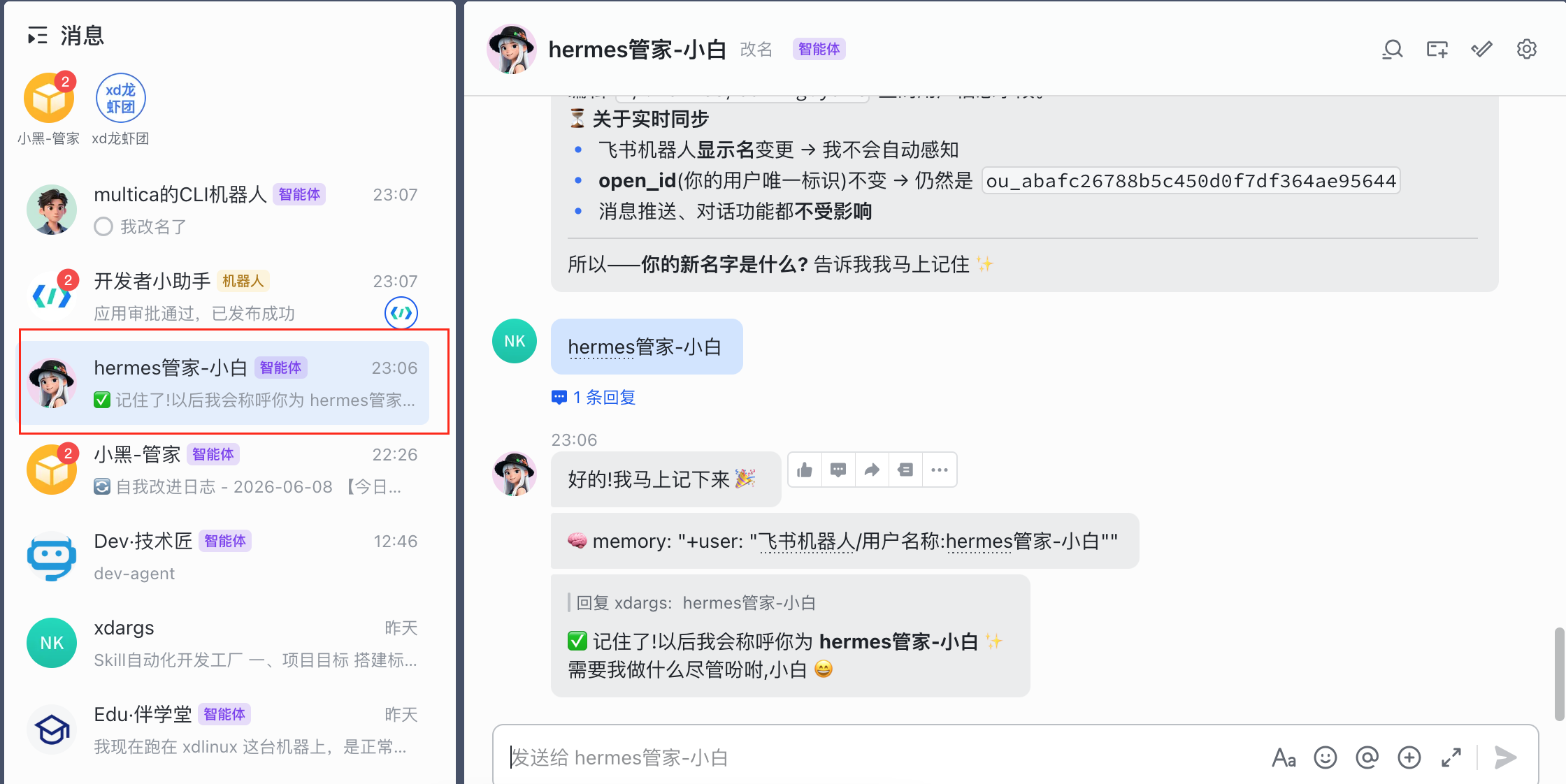
聊天窗口:
5. 多agent + 多飞书机器人
可以创建多个agent,每个有各自的飞书交流通道。
hermes profile list 查看当前存在的agent。
5.1. 创建新agent
1、创建agent,hermes profile create xxx(agent名):
1
2
3
4
5
6
7
8
9
10
11
12
13
14
15
16
17
18
[root@xdlinux ➜ .hermes git:(main) ✗ ]$ hermes profile create hermes-dev-agent

Profile 'hermes-dev-agent' created at /root/.hermes/profiles/hermes-dev-agent
74 bundled skills synced.
Wrapper created: /root/.local/bin/hermes-dev-agent

⚠ /root/.local/bin is not in your PATH.
  Add to your shell config (~/.bashrc or ~/.zshrc):
    export PATH="$HOME/.local/bin:$PATH"

Next steps:
  hermes-dev-agent setup              Configure API keys and model
  hermes-dev-agent chat               Start chatting
  hermes-dev-agent gateway start      Start the messaging gateway

  ⚠ This profile has no API keys yet. Run 'hermes-dev-agent setup' first,
    or it will inherit keys from your shell environment.
  Edit ~/.hermes/profiles/hermes-dev-agent/SOUL.md to customize personality
上面会创建一个hermes-dev-agent的同名工具,查看内容可看到封装了一层hermes命令。/root/.local/bin并不在我的PATH环境变量里,可以~/.zshrc里加一下。
1
2
3
[root@xdlinux ➜ .hermes git:(main) ✗ ]$ cat /root/.local/bin/hermes-dev-agent
#!/bin/sh
exec hermes -p hermes-dev-agent "$@"
2、用agent同名工具进行setup配置,类似第一次配置hermes setup时的设置
1
hermes-dev-agent setup
配置飞书配对时,也用hermes-dev-agent:
1
2
3
4
[root@xdlinux ➜ ~ ]$ hermes-dev-agent pairing approve feishu 7KW26UPR

  Approved! User ou_453885d5c3492c702de2981dad1593a8 on feishu can now use the bot~
  They'll be recognized automatically on their next message.
6. 其他配置
6.1. 审批模式
模式和行为:
manual(默认)对所有危险命令始终提示用户确认smart使用辅助 LLM 评估风险。低风险命令(如 python -c “print(‘hello’)”)自动批准。真正危险的命令自动拒绝。不确定的情况升级为人工提示。off禁用所有审批检查——等同于使用--yolo运行。所有命令无提示直接执行。
~/.hermes/config.yaml里面,此处我改成smart,省得每次要等手动批准。
1
2
approvals:
  mode: smart
This post is licensed under CC BY 4.0 by the author.